The formats people actually send
GLB, glTF, FBX, OBJ, STL, PLY, 3MF, DAE, USD and USDZ meshes, plus CAD as STEP, IGES, BREP and Rhino 3DM, and IFC building models. CAD files are turned into meshes on import, so there is no separate converter.
Online 3D viewer
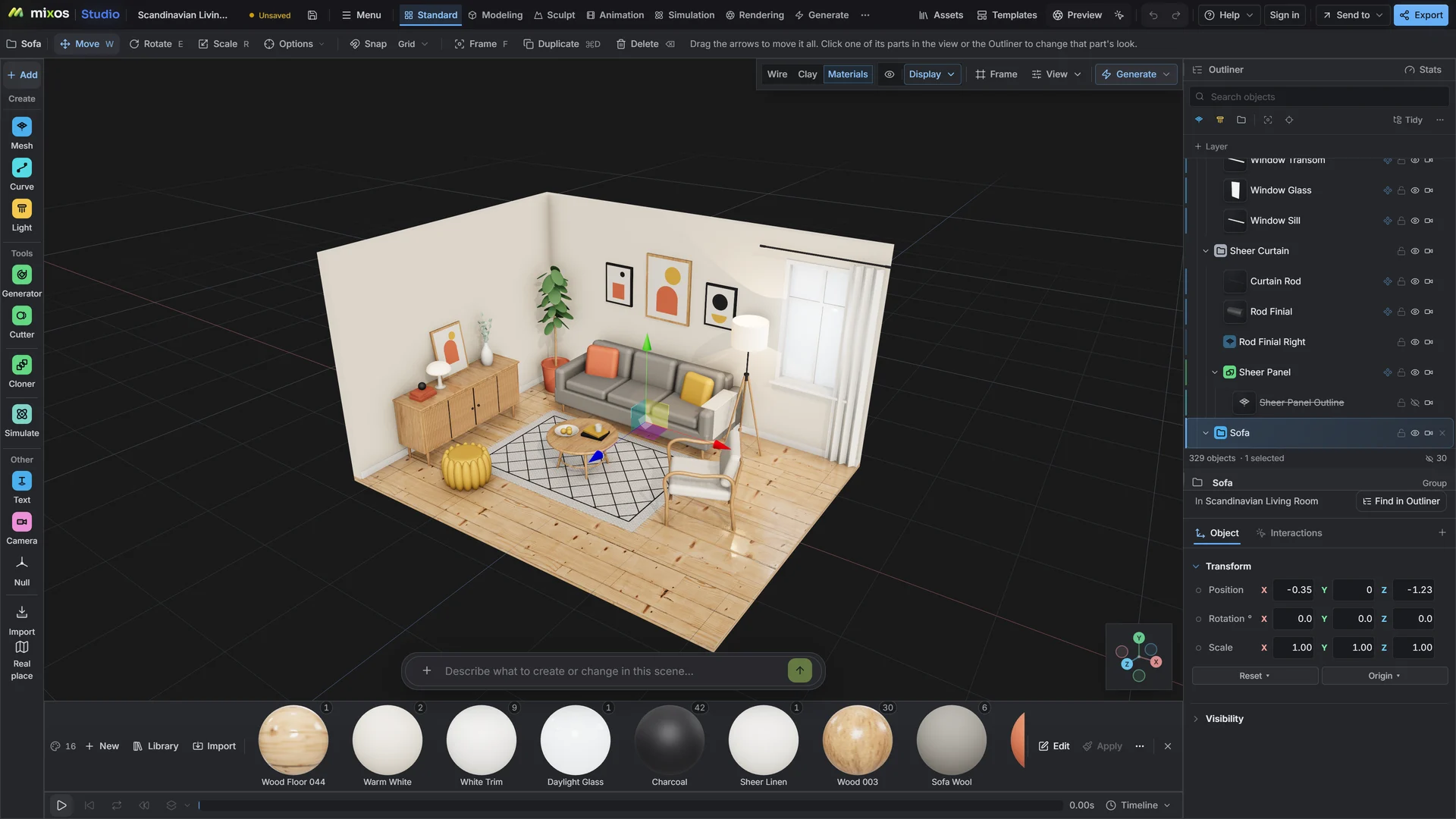
Drop in an FBX, GLB, OBJ, STL, USD or STEP file and it opens in a full 3D scene, with its parts, names and materials. Orbit around it, check its size, hide what is in the way, and when you want more than a look, light it and render it in the same tab.
GLB, glTF, FBX, OBJ, STL, PLY, 3MF, DAE, USD and USDZ meshes, plus CAD as STEP, IGES, BREP and Rhino 3DM, and IFC building models. CAD files are turned into meshes on import, so there is no separate converter.
The file's hierarchy arrives as named objects in the outliner. Select a part, hide it, isolate it or read its real-world size, instead of guessing from a single frozen preview.
The same tab is a full 3D editor. Swap placeholder materials from a library of real ones, add a light rig or an HDRI sky, and path-trace a still or a turntable when the model is ready to show.
Save the scene and it is there on the next machine you sign in from, with the same camera and lights. A single model file can be up to 150 MB.
Why Mixos
Most online 3D viewers answer one question: does the file open? That is often all you need. Studio answers it too, but the reason to open a model here is what comes after: the client wants a picture of it, the model needs a better material, or someone asks how big it actually is.
Because the model lands in a real scene rather than a fixed preview, those next steps happen without exporting and re-importing. Its parts keep their names, its scale is read from the file's units, and the materials it arrived with are editable rather than baked into a thumbnail.
CAD is the case where a plain viewer usually stops. A STEP or Rhino 3DM file from an engineer or a product designer is turned into meshes on import, so you can light and render a part without converting it in another program first.
Opening, inspecting, lighting and previewing are free with a free account. Saving finished renders, video or the model itself without a watermark is part of Pro at $8.99 a month or the one-time $99 license.
Meshes as GLB, glTF, FBX, OBJ, STL, PLY, 3MF, DAE, USD and USDZ; CAD as STEP, IGES, BREP and Rhino 3DM; building models as IFC; and a few older formats such as 3DS and VRML. A Gaussian-splat PLY opens as a splat rather than a mesh.
No. It runs in the browser with WebGPU: current Chrome or Edge on Windows, macOS, Linux or ChromeOS, or Safari on iPadOS 26 and later. You need a free account to open Studio.
A single model file can be up to 150 MB. Very dense meshes open, but tools such as texturing get slower on them, and a phone or tablet has less memory to work with than a desktop.
Yes. A rigged GLB or FBX, such as a Mixamo character, comes in with its skeleton as ordinary bones and its animation clips as tracks you can play, retime and edit.
Opening and inspecting a model is free with a free account. Taking something out, such as a finished render, a video or the model in another format, needs a paid plan.
Read next
Vertices, edges and faces — the box-modelling fundamentals.
Which of the two approaches fits the thing you're making.
Which format keeps materials and which throws them away.
Why the same texture reads bigger on one model than another.
Keep exploring
More in Animation & rendering