Education
Free 3D texturing for your classroom
If you teach 3D, game art, or design, we'll give your whole roster paid Mixos for the term — 4K watermark-free export, a shared class library, and the full suite on every machine. No cost, no card, no per-student paperwork.
Use built-in assignments and grading, with a Google Classroom integration pilot for invited classes.
Apply for a grant →
Set assignments, collect what your students hand in, and mark it on the model itself — built into the tool, so there's no second system to run your course through.
It runs in a browser tab, so it works on the lab machines you already have — Windows, Mac, or Chromebook. Nothing to install, nothing for IT to package, nothing to license per seat.
And there is no AI generation on a classroom account — for students and instructors alike. Students practice with brushes, layers, masks, and material tools; your assignment policy defines acceptable imported assets.
Grants go to instructors, cover a named course, and run for one term. Students applying on their own already have the free plan, which is a real product — the whole editor, no time limit.
What the grant covers
Assignments and hand-in
Post a brief with a due date and an optional starter model. Students hand work in from the editor; you see who has, who hasn't, and who was late.
Grade it in 3D
Open any submission, spin the actual model, and leave feedback and a grade on the work itself. Export the whole roster's grades as a CSV for your gradebook.
4K export, no watermark
Students take production PBR map sets out at full resolution — the thing the free plan holds back. Their coursework leaves Mixos looking like professional work.
A shared class library
One library every student on the roster can see. Drop in the models, materials, and reference the assignment is built on, and everyone starts from the same place.
The suite, without the AI
Studio, Paint, Mold, Logo, and the node material editor — plus the desktop app, on Mac and Windows, for the lab machines. Auto is the one app not included: generating textures is all it does.
Nothing else is metered
Painting, baking, UV unwrapping, the 3,000-material library, the CC0 model library — none of it is rationed or counted, for the whole term.
No AI generation, at all
Generative AI is switched off for every classroom account. Students can't generate images, textures, or models on a class seat — and neither can you. It isn't a setting an instructor can turn on, so your department gets one answer rather than “it depends who's teaching”. Imported files can come from other tools, so state acceptable sources and process evidence in your assignment brief. Review the classroom generation boundary.
Run your class inside the tool
Set work, collect it, and mark it in the same place your students are working. No second system to set up, and nothing for them to export and email you.
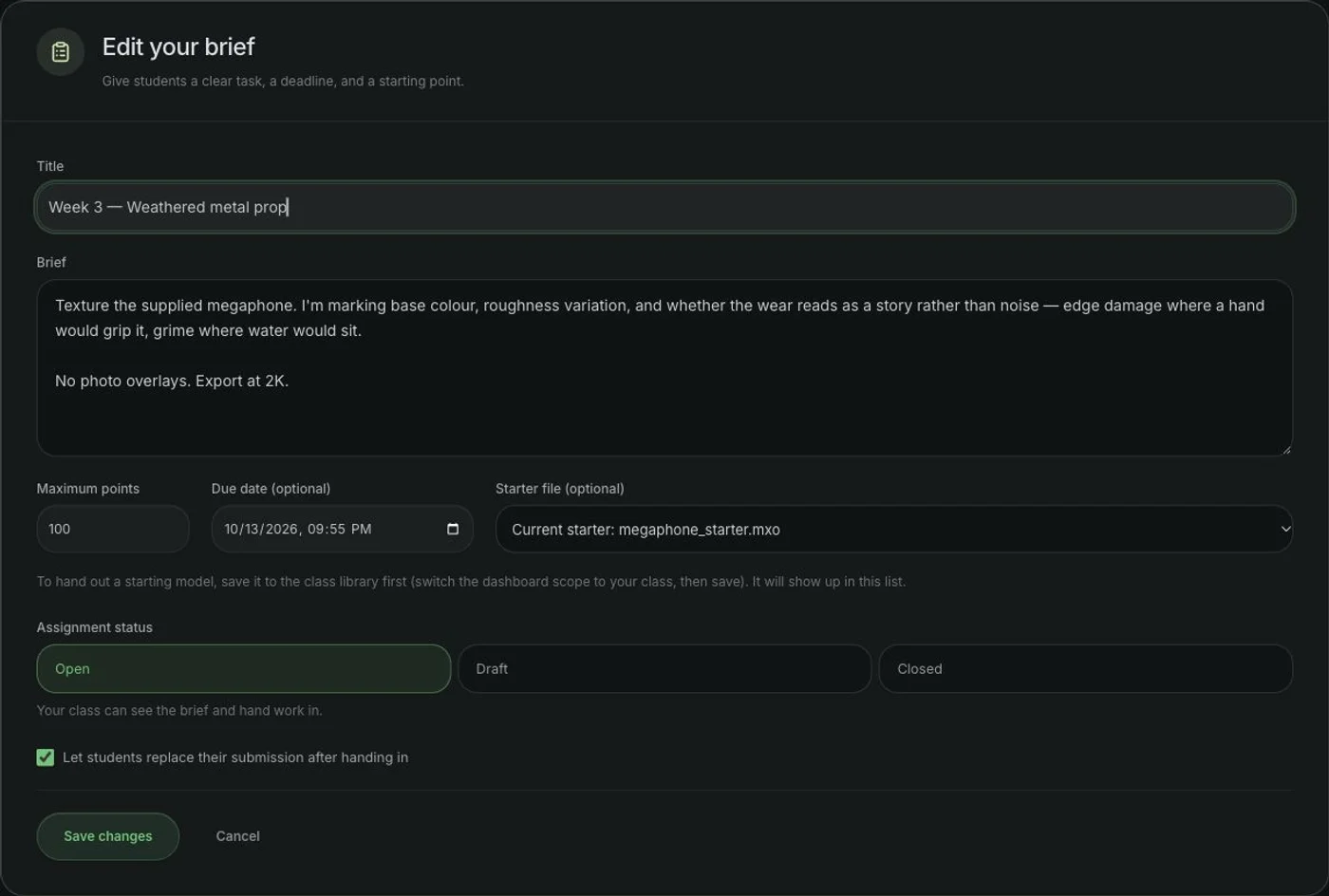
Post the brief
Title, instructions, a due date, and — if you're supplying the model — a starter file from your class library. Save it as a draft while you write it; publish when you're ready.
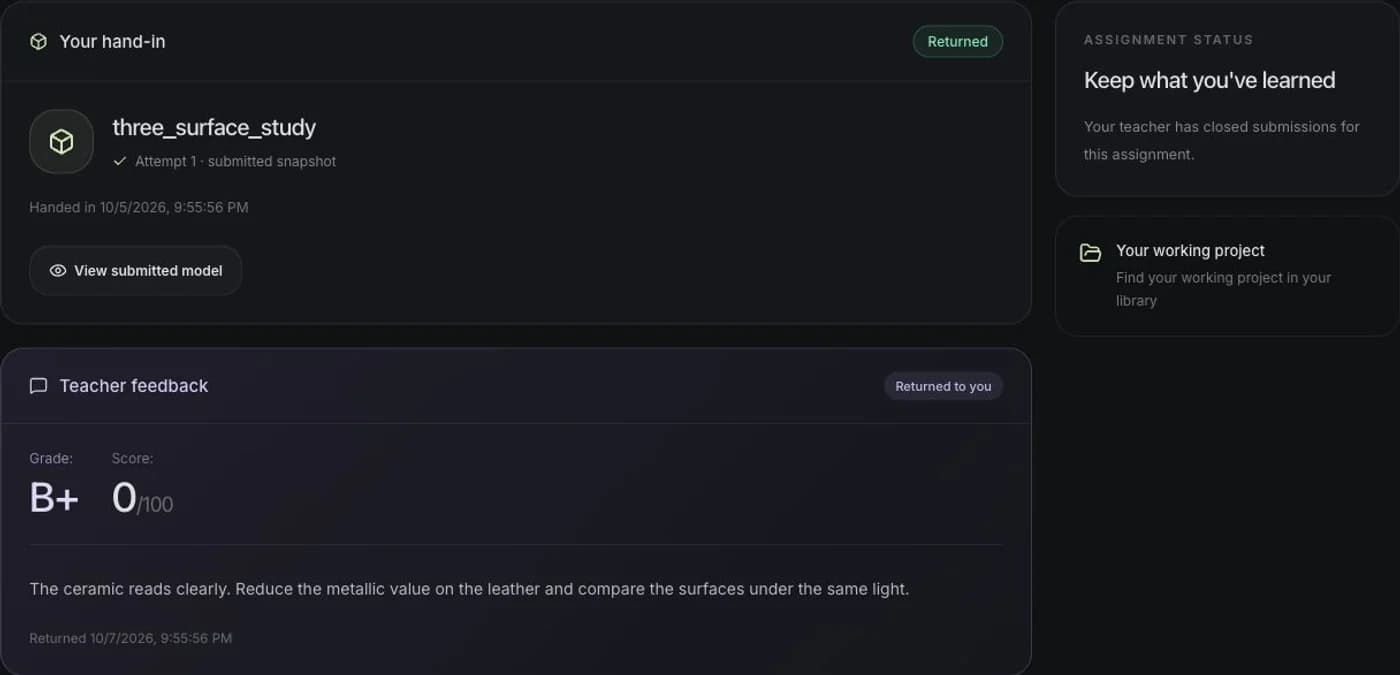
Students work and hand in
They open the starter file or their own model, texture it, and hand in from the export sheet. Handing in freezes a snapshot, so the deadline means something even though they keep working on the project afterwards.
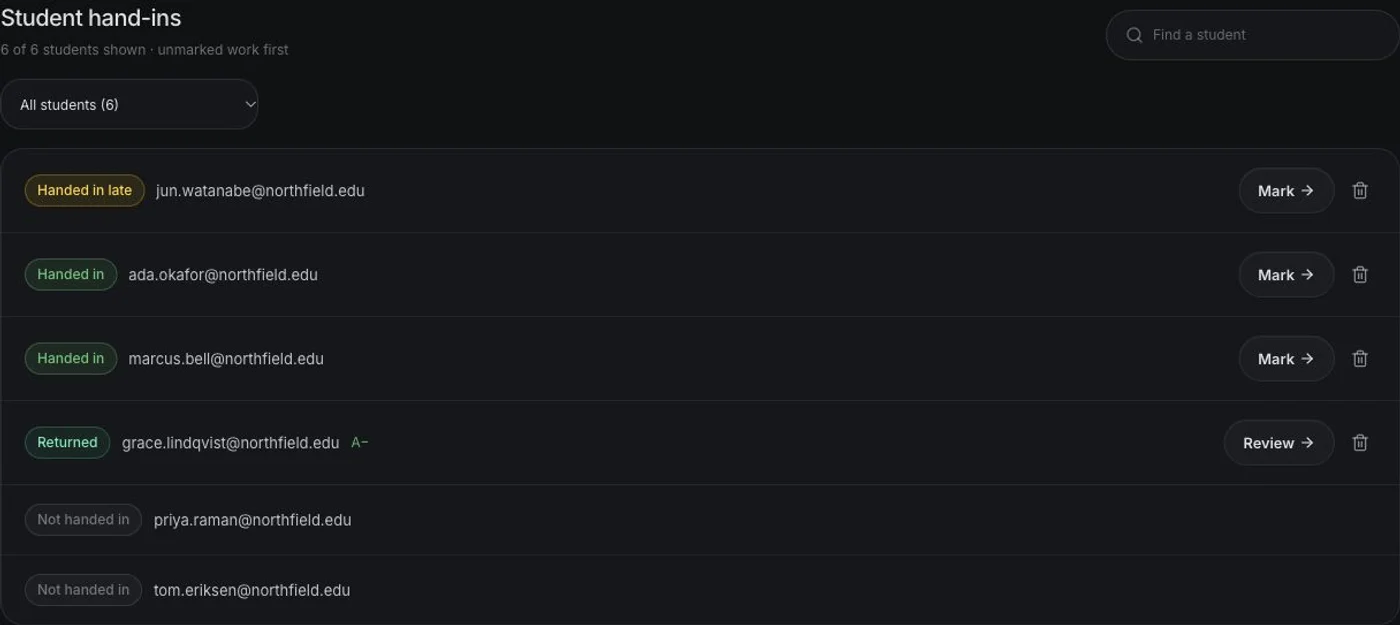
You see the whole roster
One list: handed in, handed in late, not handed in, returned. The students who submitted nothing are the ones you need to see, so they're on the list too — not missing from it.
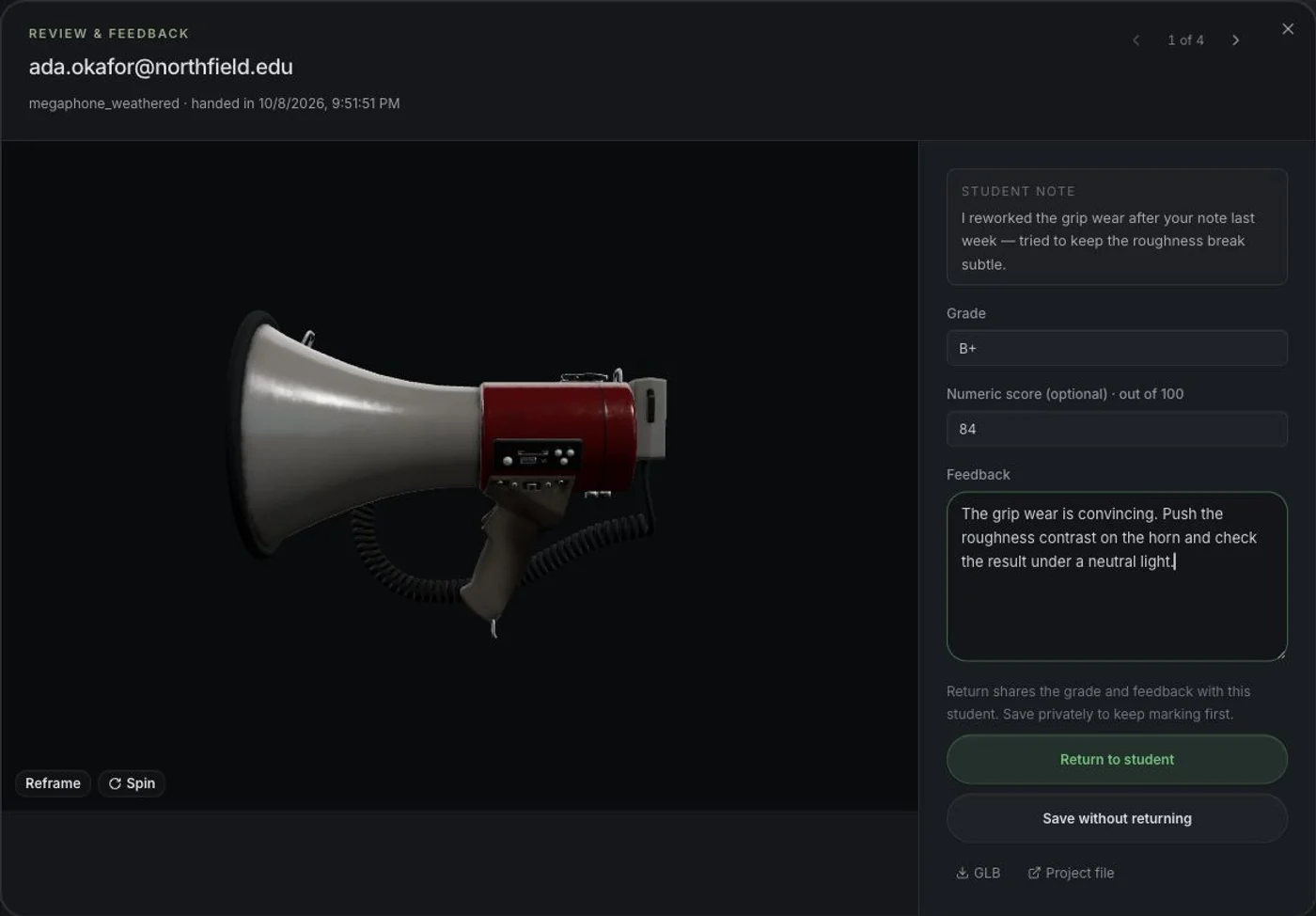
Mark it on the work
Open a submission and the model itself is there to rotate and inspect. Write feedback, put a grade on it, and return it — or save your notes and release the whole set at the end.
Screens from the app. The class, the students and the work in them are made up.
Privacy, plainly: a student's projects are private to them, and a submission is visible to you and to the student who made it — never to their classmates. Invite your whole roster by pasting the class list; seats free up when someone leaves, so you can re-fill them across the term.
Invited pilot classes
Connect 3D assignments to Google Classroom
Publish a Mixos assignment's brief, deadline, points, and link to your linked Google Classroom course. Review the submitted model in Mixos, return the work, then sync released numeric scores. Draft marking stays private and detailed feedback stays in Mixos.
Students submit in Mixos and turn in manually in Google Classroom. Access is currently limited to invited pilot classes. Ask about the pilot in your application notes; classroom grants and integration access are reviewed separately. You can run a class with Mixos assignments and CSV grade export without connecting Google Classroom.
Explore the Google Classroom workflow →Who qualifies
Yes
- Instructors at accredited universities, colleges, and secondary schools
- A specific course you are teaching this term or next
- An institutional email address we can verify
- Bootcamps and non-profit training programs — tell us about it in the notes
Not this
- Individual students — the free plan already covers you
- Commercial studios with a training arm
- Work produced for a client or shipped commercially
- Whole-department rollouts — email us and we'll quote an institutional license
How it works
You apply
The form below, with a link we can verify you by — your faculty page, a department listing, or the syllabus. Two minutes.
We review by hand
Usually a couple of working days. Every application gets an answer either way — we don't leave people waiting on silence.
You activate and invite
Approval mails you a link that creates your class. Invite students by email from your class roster; seats are yours to fill and re-fill.
The term ends
Access lapses on the date on your approval. Accounts drop to the free plan and everyone keeps every project they made. Teaching it again? Renew in one reply.
Apply
You don't need a Mixos account to apply — only to activate, once you're approved.
Questions instructors ask
- Is Mixos really free for students?
- Yes. The editor is free for everyone with no time limit, and a classroom grant adds the paid features — 4K watermark-free export, a shared class library, and the assignment and grading tools — free for your whole roster for the term. There's no cost, no credit card, and no per-student purchase.
- Can I set assignments and see my students' work?
- Yes — it's built in, not a separate product. You post a brief with a due date and an optional starter model, and it appears for everyone on your roster. Students hand work in from the editor when they're finished, which freezes a snapshot of exactly what they submitted. Your class page then shows the whole roster at a glance: who has handed in, who hasn't, and who was late. You open any submission in a 3D viewer, spin the model, leave written feedback and a grade, and return it to the student.
- Does Mixos use AI? Can students generate images with it?
- Generative AI is switched off for classroom accounts — students and instructors cannot generate images, textures, or models on a class seat. It is not a setting an instructor can enable. Mixos consumer products include AI features; the classroom offering does not include generation. Imported assets can come from other tools, so your assignment policy should state which sources are allowed.
- Can students see each other's work?
- Only what you deliberately share. A student's projects are private to them, and a submission is visible to the instructors of that class and to the student who made it — never to classmates. The one shared space is the class library, which is where you put the models, materials, and reference the assignment is built on.
- How do grades get into my gradebook?
- Every assignment exports a CSV of the roster's submission status, grades, and written feedback for a spreadsheet or your institution's gradebook workflow. Invited Google Classroom pilot classes can also publish Mixos assignment links and sync released numeric scores. Detailed feedback stays in Mixos, and students still turn in manually in Google Classroom.
- Does Mixos integrate with Google Classroom?
- Yes, through an integration currently restricted to invited pilot classes. A teacher can connect a course, review roster matches, publish Mixos-created assignment links, and sync released numeric scores. Students submit in Mixos and turn in manually in Google Classroom. Mention your interest in the pilot in the application notes; a classroom grant does not automatically include integration access.
- What do students need to sign up?
- An email address and a browser. You invite the whole roster by pasting your class list — one address per line, straight out of a spreadsheet or your SIS — and everyone gets a join link. There's no card, no install, no license key, and no school-wide deployment step. A student who joins late just gets an invite when they turn up.
- Can students take their work with them after the course?
- Yes, and this is deliberate. Every project a student makes is on their own account, not the class's. When the term ends the account drops to the free plan — nothing is deleted, nothing is locked, and everything they made stays theirs to keep working on and to put in a portfolio.
- Does anything need to be installed on school computers?
- No. Mixos runs in a browser tab, so there is nothing for IT to package, approve, or deploy to a lab image. Students open a URL and start working, on whatever machine they're sitting at — school lab, library, or their own laptop at home.
- Does it work on Chromebooks and locked-down lab machines?
- It works on any machine with a modern browser that supports WebGPU — Chrome, Edge, and Firefox on Windows, macOS and ChromeOS, and Safari 26+ on Mac. There's a native desktop app for Mac and Windows too, but it's optional: the browser version is the full editor, not a cut-down preview.
- How many students does a grant cover?
- One grant covers a named course and its roster, up to 200 students. You invite students by email from your class page, and seats free up when a student leaves, so you can re-fill them across the term.
- What happens when the term ends?
- Access returns to the free plan on the date on your approval, and everyone keeps every project they made — nothing is deleted and nothing is locked. If you're teaching the course again, a renewal is one reply to your approval email.
- Do students own the work they make?
- Yes. Students retain ownership of the projects, models, and textures they create, and are free to put that work in a portfolio. Coursework made under a grant is for learning and portfolio use rather than commercial client work.
- Is this a Substance Painter alternative for teaching?
- The workflow carries over: stack blendable layers, isolate them with masks, drop in smart materials, and paint detail directly on the mesh, then export standard PBR maps for Unreal, Unity, Blender or Godot. Students who learn texturing here are learning the concepts, not a tool's quirks, so the skills transfer to any industry-standard package.
- Who is eligible, and how long does approval take?
- Instructors at accredited universities, colleges, and secondary schools teaching a specific course, applying from an institutional email address. Bootcamps and non-profit training programs are welcome too — mention it in the notes. Every application is reviewed by hand, usually within a couple of working days, and you'll hear back either way.
Something not answered here? Ask us — or read more about teaching 3D texturing in a browser.
Evaluating for a course