Mold vs SculptGL
Mold vs SculptGL browser sculpting, a decade on.
SculptGL got here first. It proved that sculpting in a browser tab was possible at all, it is genuinely free, and a lot of people made their first digital sculpt in it. Mold is what that idea looks like built on WebGPU with a modern toolkit and somewhere for the model to go afterwards.
Feature by feature
Mold vs SculptGL, line by line.
A lime check marks the tool with the edge on each row. Where it's a wash, neither gets one — including the rows SculptGL wins.
| Feature | Mold | SculptGL |
|---|---|---|
| Cost to sculpt | Free | Free and open source |
| Install | None — a browser tab | None — a browser tab |
| Account required | Yes, free — sculpts save to your library | No account at all |
| Graphics API | WebGPU, with Divide and remeshing in the background | WebGL |
| Brush set | 29 brushes across build, contour, move and mask | The core set — brush, inflate, smooth, flatten, pinch, crease, drag |
| Multiresolution | Yes, with free stepping between levels | Yes |
| Dynamic topology | Yes | Yes |
| Remeshing | Voxel, field-aligned quad and adaptive ZRemesh, plus decimate and project | Voxel remeshing |
| Booleans & trim | Object booleans, add and cut, lasso, box, line, curve and plane trims | Not available |
| Deform & filters | Bend, twist, taper, stretch, inflate, smooth, sharpen, noise | Not available |
| Rigging & posing | Skeleton, bind, weights and pose | Not available |
| Saving your work | Cloud library — same sculpt on every device | Local file save/load |
| Touch & stylus | Touch-first layout, Apple Pencil pressure and tilt | Mouse-oriented; limited touch support |
| Texturing afterwards | One click to a layered PBR painter with fresh UVs | Vertex painting only |
| Mesh export | GLB, OBJ, STL, 3MF, FBX — on a paid plan | OBJ, STL, PLY — free |
| Open source | No | Yes, MIT licensed |
So which should you use?
A free, open-source browser sculpting tool by Stéphane Ginier, first released in 2013. It runs on WebGL, needs no account, and covers the sculpting basics — brushes, dynamic topology, multiresolution and symmetry — in a deliberately minimal interface.
Choose Mold if…
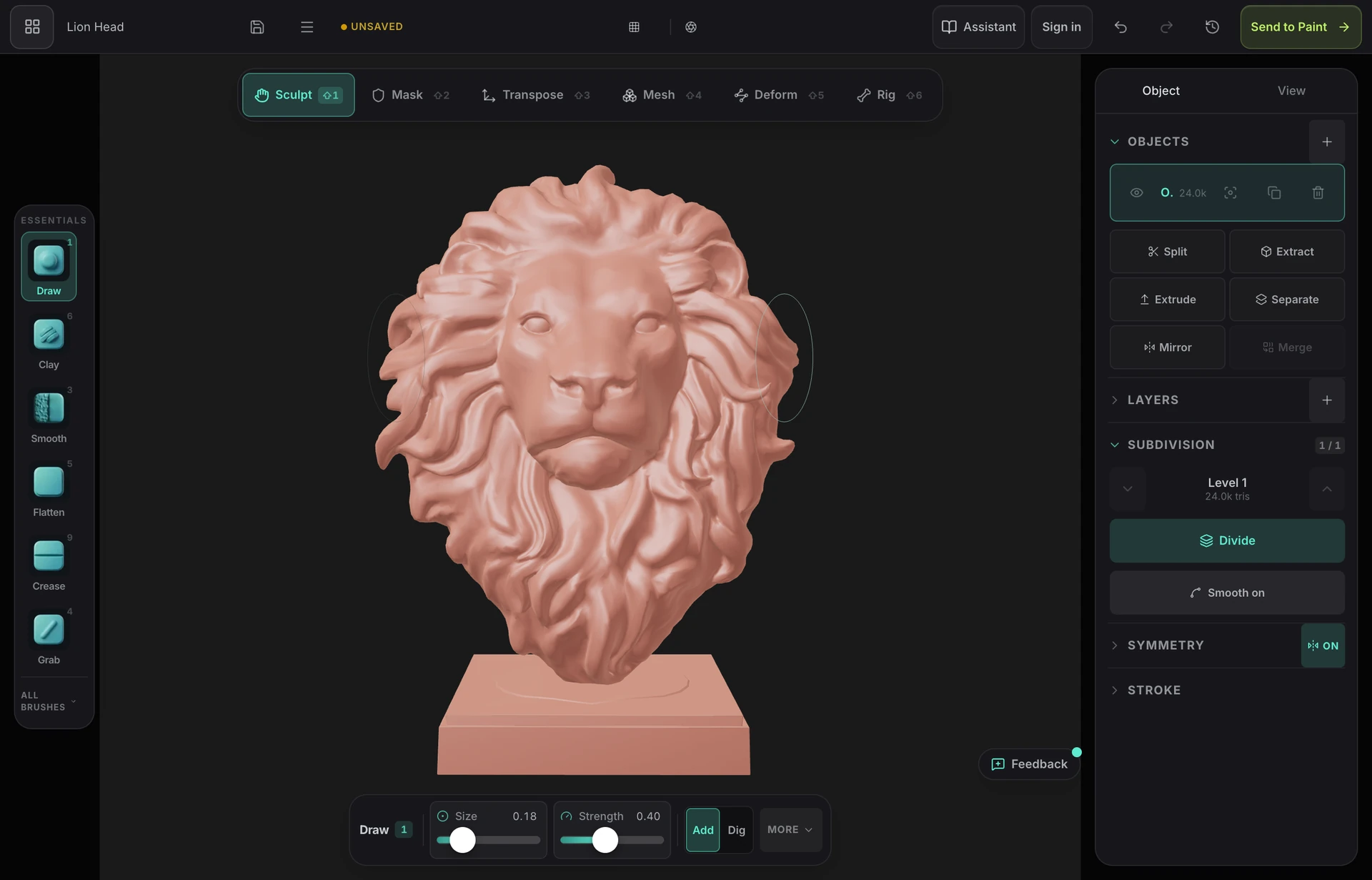
- You want the full sculpting toolkit — booleans, trim, deform filters, adaptive remeshing, rigging — rather than the core brush loop alone.
- You work across devices and want the same sculpt on a laptop, an iPad and a phone without exporting a file every time.
- You sculpt with a pen. Apple Pencil pressure and tilt drive the brushes, and the layout rearranges itself for touch rather than expecting a mouse.
- You want to texture the sculpt afterwards — one click unwraps it with fresh UVs and opens it in a layered PBR painter in the same browser.
- You want a tool that is actively developed, on the graphics API browsers are building on now.
Choose SculptGL if…
- You want no account, ever. SculptGL asks for nothing and Mold asks for a free sign-in — if that is the deciding factor, this is a real difference and SculptGL wins it.
- You need free mesh export. SculptGL exports OBJ, STL and PLY at no cost; Mold's export is on a paid plan.
- You want open-source software you can read, fork or self-host. SculptGL is MIT licensed on GitHub.
- Your machine or browser doesn't support WebGPU. SculptGL runs on WebGL, which is available on considerably older hardware.
- You want the simplest possible interface with nothing to learn beyond the brushes.
The bottom line
What a decade of browser capability changed
SculptGL was released in 2013, when running any kind of sculpting in a browser was a demonstration rather than a workflow. It is a genuinely impressive piece of work, it is still maintained, and dismissing it would be both rude and wrong — plenty of people have made real models in it, and for a first taste of digital sculpting with zero commitment it remains an excellent recommendation.
What has changed underneath is how much a browser tab can hold. SculptGL was built on WebGL for the browsers of 2013; Mold draws through WebGPU, divides its starting sphere to as many as six million triangles on a desktop with 8 GB or more of memory, and runs Divide, remeshing and loading a large sculpt in the background with progress, so the tab stays responsive on meshes in the millions of triangles.
The other difference is scope. SculptGL is deliberately a sculpting tool and stops there — you sculpt, you export an OBJ, and whatever comes next happens elsewhere. Mold treats the sculpt as the first half of a pipeline: adaptive remeshing and decimation to get usable geometry out, STL for printing, and a one-click handoff to a layered PBR texture painter in the same browser.
The honest trade is the account. SculptGL asks for nothing at all, which is a real virtue and the thing it beats Mold on most clearly. Mold requires a free sign-in because sculpts save to a cloud library rather than to a file on the machine you happen to be using — that is what makes the same sculpt open on your iPad and your desktop, but it is a cost, and if you want to sculpt without telling anyone who you are, SculptGL is the answer.
Frequently asked questions
Is SculptGL still maintained?
Yes — it is open source and still available, and it remains a reasonable way to try sculpting with zero commitment. It is built on WebGL rather than WebGPU, so its architecture predates the browser capabilities newer tools are built on.
Is SculptGL safe to use?
Yes. It is an open-source project hosted by its author, it runs entirely in your browser, and its source is public on GitHub. The caution worth having is generic to any web tool: use the official site rather than a mirror, since re-hosted copies of popular free software are a common vector for unwanted additions.
Which is better for a beginner?
SculptGL if you want the absolute minimum between you and a first stroke — no account, no sign-in, nothing. Mold if you expect to keep going: the extra brushes, remeshing options, cloud saving and the path to texturing matter more from week two onwards than they do in the first hour.
Can I export my model from either?
SculptGL exports OBJ, STL and PLY for free. Mold exports GLB, OBJ, STL, 3MF and FBX, but export is on a paid plan — sculpting, saving and sending the model to a texture painter stay free.

Try it yourself. No install.
Push, pull and carve organic form, remesh when the topology stops cooperating, then texture it — all in a browser tab, free to sculpt.