Substance Painter alternative for education

Teach PBR texturing without the deployment.

The same layer-and-mask texturing workflow your students would learn in Substance Painter, in a browser tab that needs no install, no licence keys and no lab image — plus assignments, hand-in and grading built into the tool, free for your whole roster for the term.

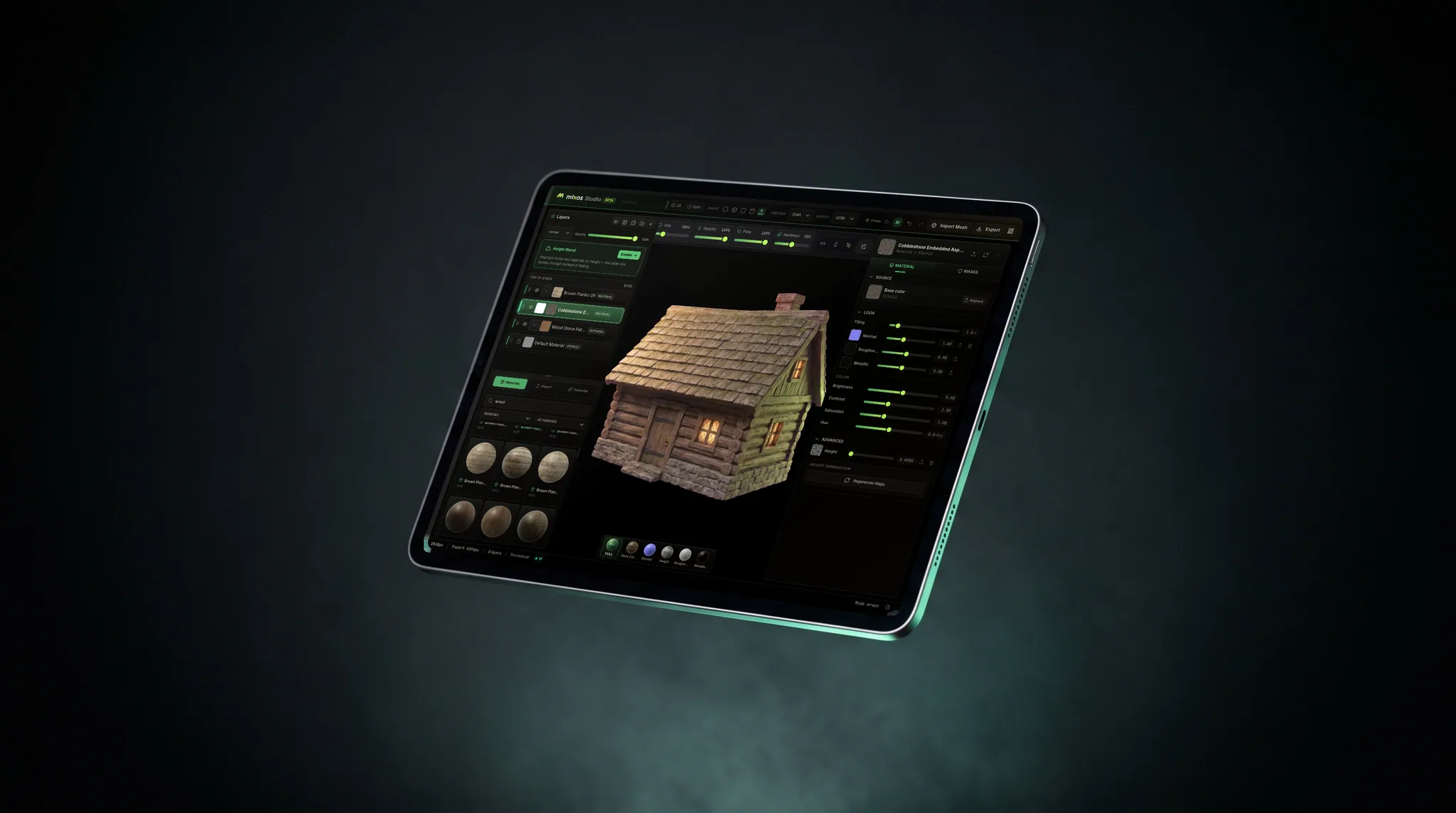
The Mixos workspace running in a browser tab — layer stack, split 3D and UV view, and material properties — the same editor every student on a roster opens from a URL

Nothing for IT to deploy

No installer to package, no licence server, no lab image to rebuild each August. Students open a URL on whatever machine they're sitting at — school lab, library, or their own laptop at home — and the work follows their account.

Coursework is part of the tool

Post a brief with a due date and a starter model, watch the roster hand in, then open a submission and rotate the actual model while you mark it. No second system bolted on beside the texturing app.

Generative AI is off. Fully.

On a classroom account nobody can generate images, textures or models — not the students, not you. It isn't a setting an instructor can flip, so your department gets one answer instead of a per-teacher policy.

Skills that transfer

Stacked blendable layers, masks, smart materials, painting on the mesh, baked mesh maps, standard PBR map sets out to Unreal, Unity, Blender or Godot. Students learn the concepts, not one vendor's quirks.

Why Mixos

What actually decides this for a course

Substance Painter is the industry standard, and a graduate who has used it is walking into a studio that runs it. Nothing on this page argues otherwise, and if your lab is already deployed and your licensing is sorted, staying put is a perfectly good answer. The reason instructors go looking is rarely the software — it's everything wrapped around it: getting a desktop package approved and imaged onto lab machines, keeping licences straight as a roster changes mid-term, and the students on Chromebooks or ageing laptops who can't run it at home when the lab closes at six.

Mixos removes that layer entirely because it is a web page. There is nothing to package, approve or deploy; a student opens a URL and starts working, and the same account works on a school machine, a library machine and their own laptop. There is a native Mac and Windows app if your lab wants one, but it's optional — the browser version is the full editor, not a cut-down preview.

The part that has no Substance Painter equivalent is the teaching side. Assignments, hand-in, grading and a shared class library are built into the product rather than living in your LMS. You post a brief with a due date and an optional starter model; students hand in from the editor, which freezes a snapshot of exactly what they submitted; your Class tab shows the whole roster including the people who submitted nothing; and you mark the work by opening the actual 3D model, spinning it, and leaving written feedback and a grade on it. Grades come out as a CSV per assignment for Canvas, Blackboard, Moodle or a spreadsheet, because your institution already has a system of record and it isn't this one.

Then there is procurement's question. Generative AI is switched off entirely on classroom accounts — students cannot generate images, textures or models on a class seat, and neither can an instructor. Mixos does sell AI generation on its consumer plans; it is simply not part of the classroom product, and it is not a toggle a teacher can turn on. Increasingly that is the first thing an art department is asked about a new tool, and very little in this category can answer it with a flat yes.

A grant covers a named course and its roster — up to 200 students — for one term, free. It adds 4K watermark-free export, the shared class library and the coursework tools on top of an editor that is already free for anyone to use. Applications are reviewed by hand, usually within a couple of working days, and every one gets an answer either way.

Frequently asked questions

Is this really free for a whole class?

Yes. The editor is free for everyone with no time limit, and a classroom grant adds the paid features — 4K watermark-free export, the shared class library, and the assignment and grading tools — free for your entire roster, up to 200 students, for the term. No cost, no card, no per-student purchase.

Does anything need to be installed on lab machines?

No. Mixos runs in a browser tab, so there is nothing for IT to package, approve or deploy to a lab image. That is usually the single biggest difference for a department evaluating this against a desktop texturing suite. A native Mac and Windows app exists and some labs prefer it, but it is optional.

Will the skills transfer to Substance Painter?

Yes, because the model is the same one the whole category shares: stack blendable layers, isolate them with masks, drop in smart materials, paint detail directly on the mesh, bake mesh maps, and export standard PBR sets. A student who learns texturing here is learning the concepts rather than one program's menus, and moving to Substance Painter afterwards is a matter of finding where things live.

Can students generate textures with AI?

No. Generative AI is switched off entirely for classroom accounts — students cannot generate images, textures or models on a class seat, and neither can you. It is not a setting an instructor can enable, so there is one answer for the whole department. Everything students make under a grant is made by hand.

How do assignments and grading work?

You post a brief with a due date and an optional starter model from your class library. Students hand in from the editor, which freezes a snapshot of exactly what they submitted, so the deadline means something even though they keep working on the project afterwards. Your Class tab lists the whole roster — handed in, late, not handed in, returned — and you mark work by opening the submission, rotating the model, and leaving feedback and a grade on it.

How do grades get into my gradebook?

Every assignment exports a CSV of the whole roster — student, status, submission time, attempt, grade and your written feedback — which opens in Excel or Google Sheets and imports into Canvas, Blackboard, Moodle or whatever your institution runs. We deliberately don't ask you to move your marking into a system of record you already have.

What happens to student work when the term ends?

Every project a student makes is on their own account, not the class's. When the grant lapses their account drops to the free plan — nothing is deleted and nothing is locked, and everything they made stays theirs to keep working on and to put in a portfolio.

Who is eligible?

Instructors at accredited universities, colleges and secondary schools teaching a specific course, applying from an institutional email address. Bootcamps and non-profit training programmes are welcome too — mention it in the notes on the form.

Mixos

Free for your class. For the whole term.

Apply with your institutional email and a link we can verify you by. Reviewed by hand, usually within a couple of working days, and you get an answer either way.