ZBrush alternative

A free ZBrush alternative that opens in a tab.

Push, pull, smooth and crease organic form with pressure-sensitive brushes, take a base mesh into millions of triangles with multiresolution subdivision, and remesh when the topology stops cooperating. It runs on your GPU in a browser tab, it's free to sculpt, and the model hands straight to a PBR texture painter when you're done.

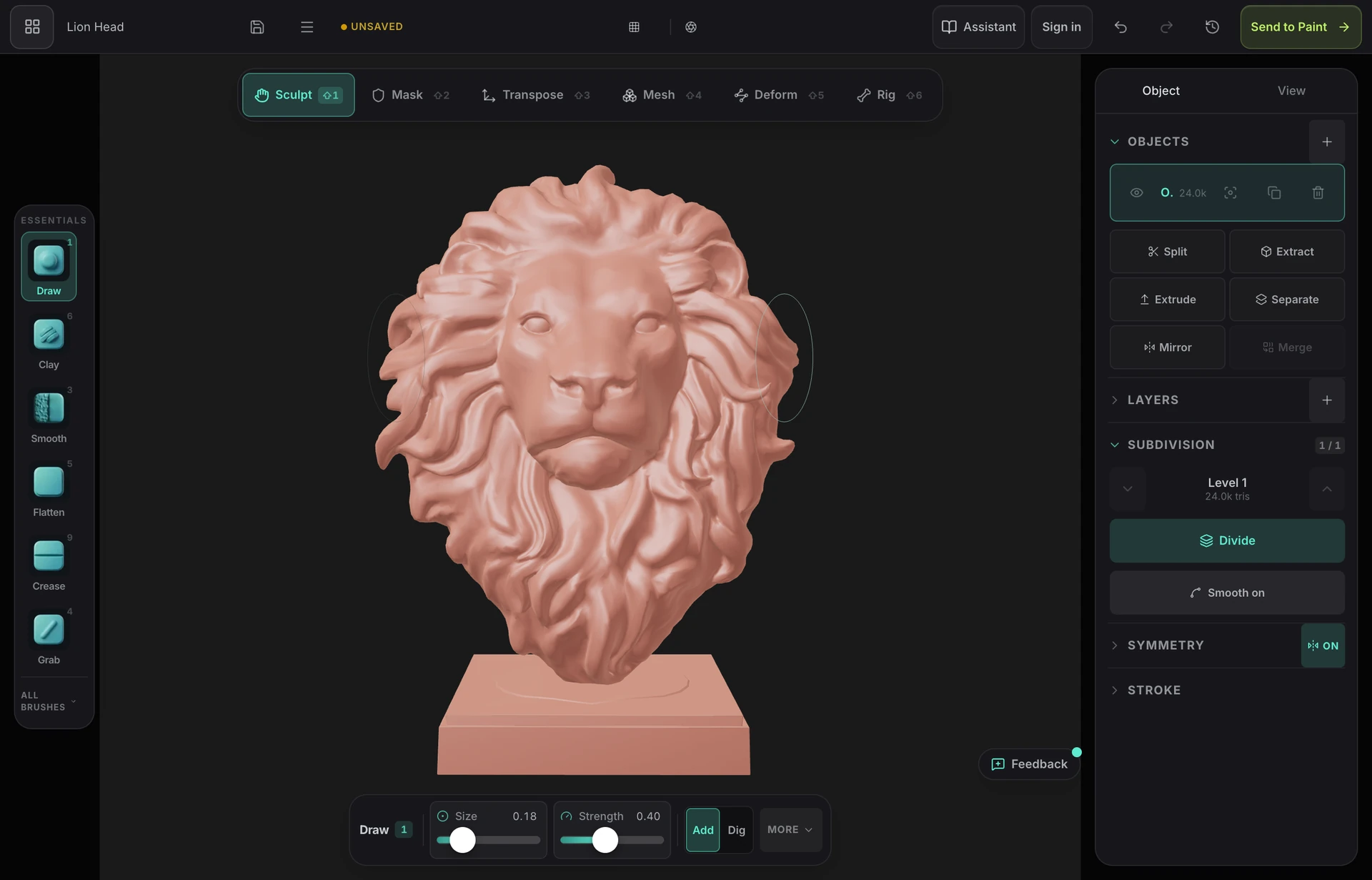
The Mold sculpting interface in a browser tab — the brush rail, the six-mode toolbar, a sculpted creature head in the viewport, and the subdivision and symmetry panels

The brushes that matter

Draw, clay, inflate, grab, flatten, pinch, crease, scrape, polish and trim — pressure-sensitive, with falloff, symmetry and masking. The core sculpting loop, not a toy subset of it.

Multires and dynamic topology

Subdivide to sculpt broad form low and fine detail high, stepping between levels freely. Or turn on dynamic topology and let the mesh tessellate under the brush — the roles Sculptris Pro and DynaMesh play in ZBrush.

Nothing to install or licence

No multi-gigabyte installer, no licence activation, no maintenance plan. Open a URL on Mac, Windows or Linux — or on an iPad with an Apple Pencil — and start sculpting.

Sculpt, then actually texture it

ZBrush hands you a high-poly mesh and wishes you luck downstream. One click here unwraps the sculpt with fresh UVs and opens it in a layered PBR painter, in the same browser.

Why Mixos

What you give up, and what you don't

ZBrush is the industry standard for a reason: two decades of depth, hundreds of configurable brushes, ZRemesher, ZModeler, Fibermesh, and a place in almost every film and games character pipeline. If you sculpt production characters for a living, none of that is replaceable, and this page is not going to pretend otherwise.

What Mold does is take the part most people actually use every day — direct, pressure-sensitive brush sculpting over a subdivided mesh, with masking, mirror and radial symmetry, dynamic topology, and voxel or quad remeshing — and run it on the GPU in a browser tab. Vertices are displaced on the same WebGPU device that renders the viewport, so dense meshes stay responsive without a workstation, and there is no install, no licence server and no version to keep current.

The other real difference is what happens after the sculpt. A ZBrush high-poly is the start of a long trip: retopologise, unwrap, bake, then texture somewhere else entirely. Mold hands the sculpt to Mixos Studio with fresh UVs in one click, ready for layered PBR materials, masks and wear — so the path from blockout to a textured, exportable asset stays inside one browser tab.

It is also free to sculpt. Every brush, every subdivision level, dynamic topology, remeshing, masking, symmetry, multi-object scenes and rigging are available on a free account, with no time limit and no watermark on your work. A paid plan is what lets you export the finished mesh as GLB, OBJ or STL — so you can learn the tool, block out a model and take it all the way to textured before deciding whether it's worth paying for.
Frequently asked questions

Is there a genuinely free alternative to ZBrush?

Mold is free to sculpt on any Mixos account — all the brushes, subdivision levels, dynamic topology, remeshing, masking and symmetry, with no trial clock and no watermark on your work. Exporting the finished mesh as GLB, OBJ or STL is on a paid plan. Blender is the other serious free option: it sculpts well and it's fully free including export, but it's a desktop install and a much larger program to learn.

Can it really replace ZBrush?

For learning to sculpt, concepting, hobby work, 3D printing prototypes and game-ready props — realistically yes. For professional character and creature pipelines, no: ZBrush's brush depth, ZRemesher, ZModeler and its ecosystem of plugins and studio workflows go far beyond what a browser tool covers today. We'd rather you knew that up front than found out three days in.

What do I need to run it?

A browser with WebGPU — current Chrome or Edge on Mac, Windows or Linux. No install and no plugin. It also runs on iPad and phones with a touch-first layout, including Apple Pencil pressure, which is something the desktop ZBrush licence doesn't cover.

Does it handle millions of polygons like ZBrush?

Multiresolution subdivision takes a base mesh into millions of triangles, and the engine displaces vertices on the same GPU device that draws the viewport, so strokes stay responsive on dense meshes. It won't match a workstation running ZBrush on a 40-million-polygon production sculpt, but it holds up well past the point most work needs.

Can I open my .ztl files?

No — ZBrush's tool format is proprietary and isn't readable here. Export your sculpt from ZBrush as OBJ, FBX or GLB and import that instead; it comes in as a sculpt base with its geometry intact, ready to keep working on.

How do I texture a sculpt once it's done?

One click unwraps it with fresh UVs and opens it in Mixos Studio, a layer-based PBR texture painter — paint materials, add masks and edge wear, then export standard map sets for Blender, Unreal, Unity and the rest. That handoff is free too; only the final export needs a plan.

Mixos

Open a tab. Start texturing.

No download, no setup, nothing to license. Auto-texture your first model and build real PBR materials in minutes.
