Free to author
Paint, layer, mask, bake, and preview in real time at no cost — the whole editor, not a crippled trial.
Free Substance Painter alternative
Mixos gives you the Substance-style workflow — layers, masks, smart materials, paint-on-mesh — with no subscription and nothing to install. The entire editor is free; you only pay when you need high-resolution, watermark-free export.
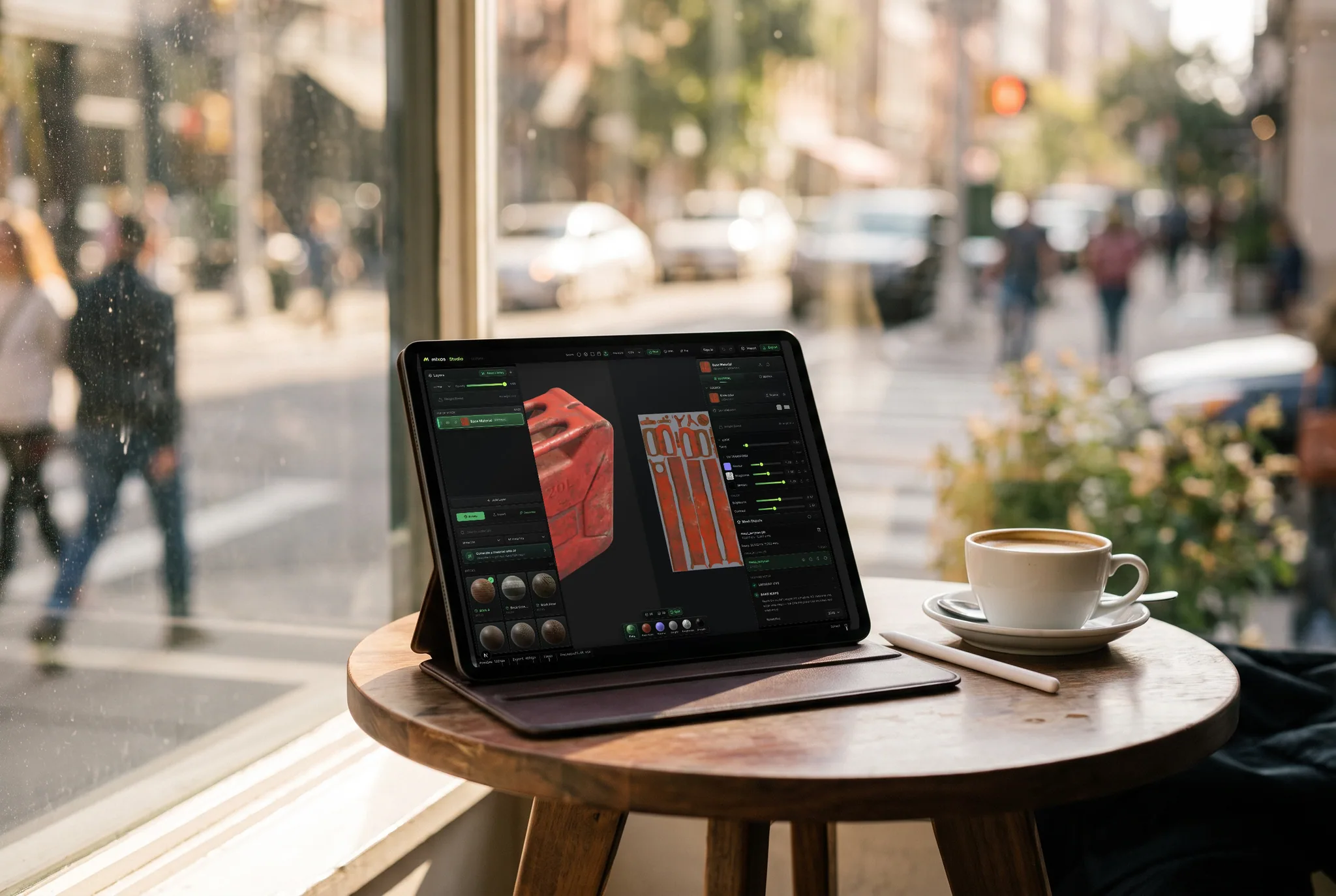
Paint, layer, mask, bake, and preview in real time at no cost — the whole editor, not a crippled trial.
Non-destructive layers, masks, smart materials, and projection painting — the mental model carries straight over.
No per-seat license or subscription to author. Ideal for students, hobbyists, and anyone trying texturing.
Upgrade for watermark-free 4K export, a cloud project library, and more AI credits — only when you need them.
Feature by feature
What each costs and what you get, compared honestly. A check marks the tool with the edge on each row — including the rows Substance wins.
| Feature | Mixos | Substance 3D Painter |
|---|---|---|
| Price | Free to author, with no time limit | Paid subscription or a perpetual Steam license |
| Free option | The whole editor — paint, layer, mask, bake, preview | Time-limited free trial |
| Exporting maps | Needs a paid plan or perpetual license | Included with any paid license |
| Students and teachers | Free editor; instructors can apply for a classroom export grant | Free education license for eligible students and teachers |
| Runs on | Any WebGPU browser, nothing to install — including Chromebook and iPad | Desktop install on Windows, macOS and Linux |
| Layers and masks | Blendable layers, masks, height blend | Yes — the reference implementation |
| Smart materials and generators | Smart materials, edge wear, node material graph | Deeper generators, plus Substance Designer (.sbsar) integration |
| Mesh-map baking | AO, curvature, cavity, thickness, normals, high-to-low | Highly configurable baker, including ID maps |
| AI generation | Built in; free accounts get trial credits | Separate Adobe apps (Sampler, Firefly) |
| Material library | 2,600+ CC0 PBR materials, free to use | Built-in presets plus Substance 3D Assets |
| Max export resolution | 4K on paid plans | 8K |
| Works offline | In the desktop app; the browser needs a connection | Yes |
Substance 3D Painter details reflect Adobe's public product information as of September 2026 and may change.
See the full Mixos vs Substance 3D Painter comparisonWhy Mixos
“Free” often means a 30-day trial or a watermarked toy. Mixos is different: the full editor is free to use. You can import a mesh, paint and layer real PBR materials, bake mesh maps, and preview everything in a real-time WebGPU viewport without paying or installing anything.
The honest trade is export and storage. Authoring is free with no time limit and no watermark on your work, and a free account adds trial AI credits; paid plans are what take the files out, up to 4K, plus a cloud library to keep projects and a larger monthly pool of AI generation. That keeps the cost where the production value is — final output — and leaves learning and iterating free.
Because it's browser-based, there's no workstation requirement and it runs on Mac, Windows, Linux, Chromebooks, and on an iPad — in Safari or the free App Store app, with an Apple Pencil if you have one. Your textures export as standard PBR sets, so they drop into Blender, Unreal, Unity, Godot, and any other engine.
The full editor is free with no time limit — paint, layer, mask, bake, and preview as much as you want. You only pay for watermark-free high-resolution export, cloud storage, and AI credits at volume.
Production export is unavailable on the free tier, cloud project storage is limited, and AI generation uses trial credits. The authoring tools themselves aren't limited.
Yes — non-destructive layers, masks, smart materials, mesh-map baking, and projection painting, all in the browser.
No — it renders with WebGPU in a modern browser and runs on most machines from the last several years, including laptops, Chromebooks and iPads.
For students, yes — the free editor has no time limit and no student verification to complete. Instructors teaching a course can apply for a classroom grant, which makes 4K watermark-free export and a shared class library free for the whole roster for the term. Running in a browser means nothing has to be installed on school lab machines.
Read next
The whole pass, from import to exported maps.
The maps a modern material is made of, and what each one does.
Why the same texture reads bigger on one model than another.
Drop the files in and see the material lit, in the browser.
No download, no setup, nothing to license. Auto-texture your first model and build real PBR materials in minutes.