The workflow you already know
Stack blendable layers, isolate them with masks, drop in smart materials, and paint detail right on the mesh. The mental model carries straight over.
Substance Painter alternative
Love the Substance workflow, not the install, the seat, or the workstation it's chained to? Mixos is the Substance Painter–style workflow online, in your browser — layer-and-mask PBR painting that is free to author, render-ready on export, and runs on whatever machine you're sitting at.
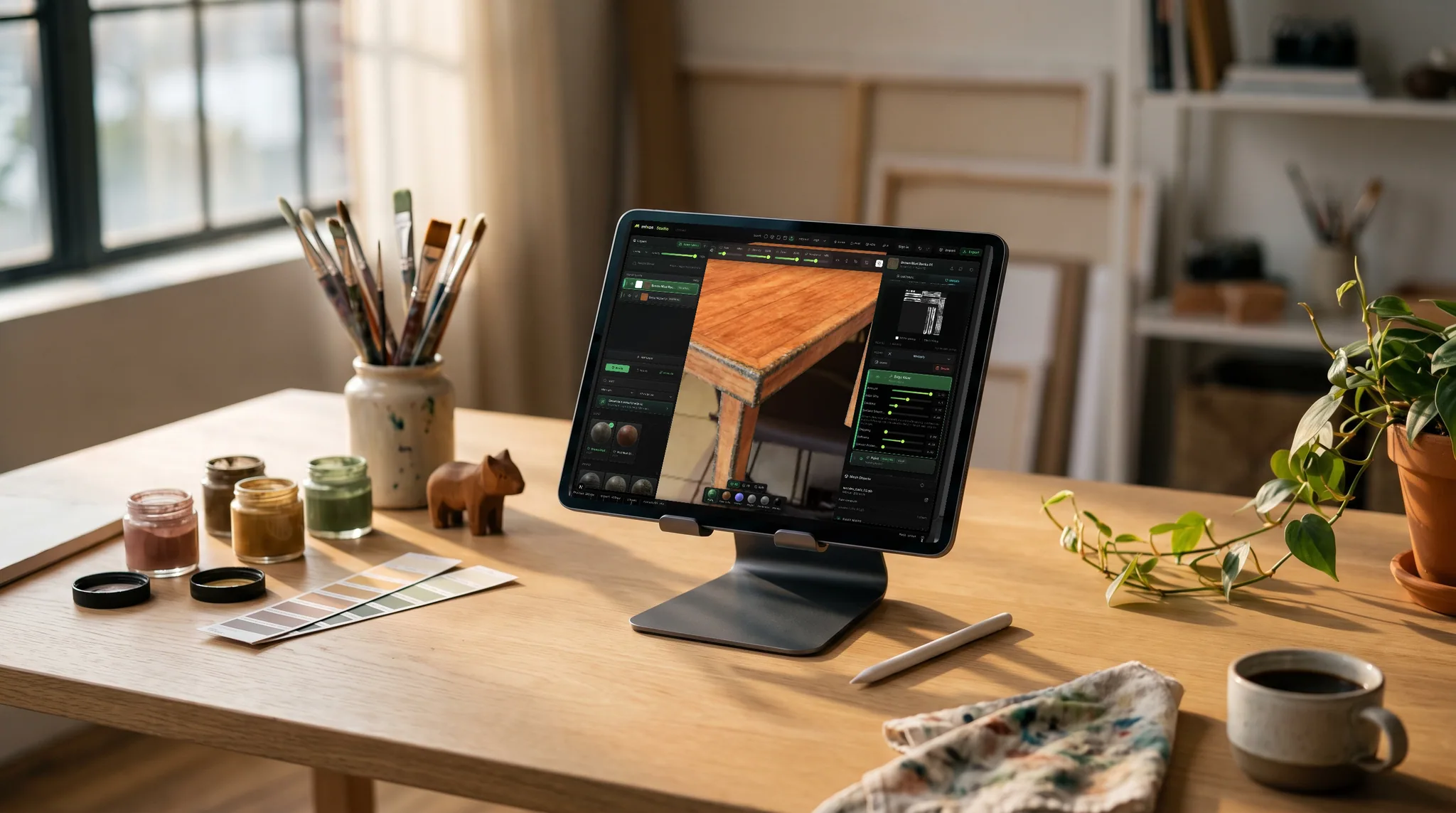
Stack blendable layers, isolate them with masks, drop in smart materials, and paint detail right on the mesh. The mental model carries straight over.
No multi-gigabyte download, no launcher, no per-seat license. Open a URL on Mac, Windows, Linux, a Chromebook or an iPad — with an Apple Pencil if you have one — and you're painting.
Export base color, normal, roughness, metallic, height, AO and a .glb — the same map sets you'd hand off from a desktop suite, ready for any engine.
Generate tiling materials, masks, brushes, and decals from a prompt, or one-click Auto-Texture a whole mesh — then refine by hand.
Feature by feature
The same layer-and-mask workflow, compared honestly. A check marks the tool with the edge on each row — including the rows Substance wins.
| Feature | Mixos | Substance 3D Painter |
|---|---|---|
| Runs on | Any WebGPU browser, nothing to install — Mac, Windows, Linux, Chromebook, iPad | Desktop install on Windows, macOS and Linux |
| Price | Free to author; a paid plan or perpetual license to export | Paid subscription or a perpetual Steam license |
| Layers and masks | Blendable layers, masks, height blend | Yes — the reference implementation |
| Smart materials and generators | Smart materials, edge wear, node material graph | Deeper generators, plus Substance Designer (.sbsar) integration |
| Mesh-map baking | AO, curvature, cavity, thickness, normals, high-to-low | Highly configurable baker, including ID maps |
| UV unwrapping | Automatic unwrap in the editor | Automatic unwrap on import |
| AI generation | Built in — materials, textures, masks, decals, Auto-Texture | Separate Adobe apps (Sampler, Firefly) |
| Material library | 2,600+ CC0 PBR materials built in | Built-in presets plus Substance 3D Assets |
| Export presets | Unreal, Unity, Godot, Blender, Cinema 4D, Roblox and more | Configurable templates for engines and renderers |
| Map file formats | PNG (8- or 16-bit), EXR, TGA, TIFF, PSD | PNG, EXR, TGA, TIFF, PSD and more |
| Max export resolution | 4K | 8K |
| Works offline | In the desktop app; the browser needs a connection | Yes |
| Live Link | Streams maps into Blender, Cinema 4D and Unreal as you paint | Via plugins and bridges |
Substance 3D Painter details reflect Adobe's public product information as of September 2026 and may change.
See the full Mixos vs Substance 3D Painter comparisonWhy Mixos
Desktop texturing suites are powerful, but they ask a lot before you paint a single pixel: a large install, GPU drivers, a license seat, and a workstation you have to sit at. Mixos keeps the part that matters — non-destructive layers, masks, smart materials, and projection painting — and delivers it through a URL using WebGPU for desktop-class PBR rendering right in the tab.
Because everything runs in the browser, collaboration and hand-off get simpler. Share a link or a portable project file instead of shipping a scene plus every dependency, and know that everyone is on the latest version with nothing to update. Your textures export as standard map sets, so they drop straight into Cinema 4D, Blender, Unreal, Unity, Godot, Houdini, and Maya.
Mixos is free to author in — you only pay to export production-resolution maps, keep a full cloud project library, and generate with AI at volume. That makes it a low-risk way to try a layer-based PBR workflow, whether you're moving off a desktop tool or picking up texturing for the first time.
The entire editor is free — paint, layer, mask, bake, and preview in real time, with trial credits for the AI generators. Paid plans add watermark-free high-resolution export, a cloud project library, and a larger monthly pool of AI credits.
Yes. Mixos exports standard PBR map sets — base color, normal, roughness, metallic, height, and opacity — plus baked maps like AO and curvature and a glTF (.glb), so they import into any renderer or game engine.
No. The editor renders with WebGPU in a modern browser (Chrome, Edge, Firefox, or Safari 26+) and runs on most machines from the last several years — including laptops, Chromebooks, and even an iPad, where Substance Painter can't run at all. There's nothing to install.
Yes — bring in GLB, glTF, FBX, or OBJ to paint and bake on, and import photos or scans as material sources.
Yes. The editor is free for any student with no time limit, and instructors can apply for a Mixos classroom grant, which gives a whole course roster 4K watermark-free export and a shared class library free for the term. Because it runs in a browser tab there is nothing to install on lab machines and nothing for IT to package — see the Education page to apply.
Adobe does not ship one — Substance 3D Painter is a desktop install on Windows, macOS and Linux, tied to a Creative Cloud seat. Mixos is the closest thing to Substance Painter online: the same layer-and-mask workflow, smart materials, mesh-map baking and paint-on-mesh, running in a browser tab through WebGPU. It is not Adobe's app and does not open .spp files, but it takes the same meshes and exports the same PBR map sets, so it drops into the same pipeline.
Read next
The whole pass, from import to exported maps.
The maps a modern material is made of, and what each one does.
Why the same texture reads bigger on one model than another.
Drop the files in and see the material lit, in the browser.
Keep exploring
Online texture painter
Free Substance Painter alternative
Substance Designer alternative
Texturing for Blender
Substance Painter alternative for education
No download, no setup, nothing to license. Auto-texture your first model and build real PBR materials in minutes.