Mold vs ZBrush
Mold vs ZBrush, compared honestly.
Both are brush-driven digital sculpting tools — push, pull, smooth, and crease organic form with symmetry, masking, and multi-million-polygon meshes. ZBrush is the desktop standard with two decades of depth; Mold runs the same core workflow in a browser tab, then hands the sculpt straight to a PBR texture painter. Here's where each one wins.
Feature by feature
Mold vs ZBrush, line by line.
A lime check marks the tool with the edge on each row. Where it's a wash, neither gets one — including the rows ZBrush wins.
| Feature | Mold | ZBrush |
|---|---|---|
| Runs in | Any WebGPU browser — Mac, Windows, Linux | Desktop app (Windows, macOS) + iPad version |
| Install & setup | None — open a URL and sculpt | Multi-GB install + license activation |
| Pricing | Free to sculpt; mesh export from $8.99/mo | Subscription via Maxon (roughly an order of magnitude more) |
| Core brush sculpting | 29 brushes, incl. Elastic Move, Pose and Move Topological | Hundreds of brushes, deeply configurable |
| Dynamic topology | Yes — live, adds and removes triangles under the brush | Yes — Sculptris Pro |
| Multiresolution subdivision | Yes — sculpt broad at low levels, detail at high | Yes — the reference implementation |
| Masking & symmetry | Yes — masks, face sets, hiding, multi-axis and radial symmetry | Yes — plus deep polygroup and selection tooling |
| Remeshing | Voxel remesh + field-aligned quad remesh to a target face count | DynaMesh + ZRemesher — the benchmark |
| Vertex paint / polypaint | No — sculpts hand off to Mixos Paint for full PBR texturing | Yes — polypaint on the mesh |
| Sculpt → PBR texture pipeline | One click into Mixos Paint with fresh UVs | Export to a separate texturing app |
| Hardware it runs on | Any machine with a WebGPU browser — including Chromebooks, Android and iPads | A Windows or macOS computer, or an iPad |
| Works offline | In the desktop app; the browser needs a connection | Yes |
| Polygon budget | Up to 6M triangles on a desktop with 8 GB+; 1.5M on iPad | Tens of millions of polygons on a workstation |
| VDM & insert-mesh brushes | Yes — capture your own VDM tips; insert parts from a library | Yes — large VDM and IMM brush libraries |
So which should you use?
ZBrush is Maxon's industry-standard desktop sculpting app — the deepest brush and topology toolset in the category and the default for character and creature work in film and games.
Choose Mold if…
- You want to sculpt without installing or licensing anything — on whatever machine you have, including an iPad.
- Texturing is part of your pipeline: Mold unwraps the sculpt and opens it in Paint's PBR painter in one click.
- You're learning digital sculpting and want the fundamentals — brushes, symmetry, masking, subdivision — without ZBrush's famously steep interface.
- A Mixos plan from $8.99/mo fits your budget better than a ZBrush subscription.
- You print what you sculpt: Mold works in real units, checks the mesh for holes and thin walls, hollows it with drain holes, and exports STL or 3MF in millimetres.
Choose ZBrush if…
- You sculpt professionally and need the deepest brush, polygroup, and ZRemesher toolset in the industry.
- Your studio pipeline is built around ZBrush files, plugins, and offline workstations.
- You need polypaint, FiberMesh, ZSpheres, ZModeler, or the broader ecosystem of a two-decade-old tool.
The bottom line
The sculpting fundamentals, minus the workstation
ZBrush earned its place — no other tool matches its brush depth, and ZRemesher is still the retopology benchmark. But that power comes with a desktop install, a subscription that costs several times a Mixos plan, and an interface that famously takes months to feel at home in.
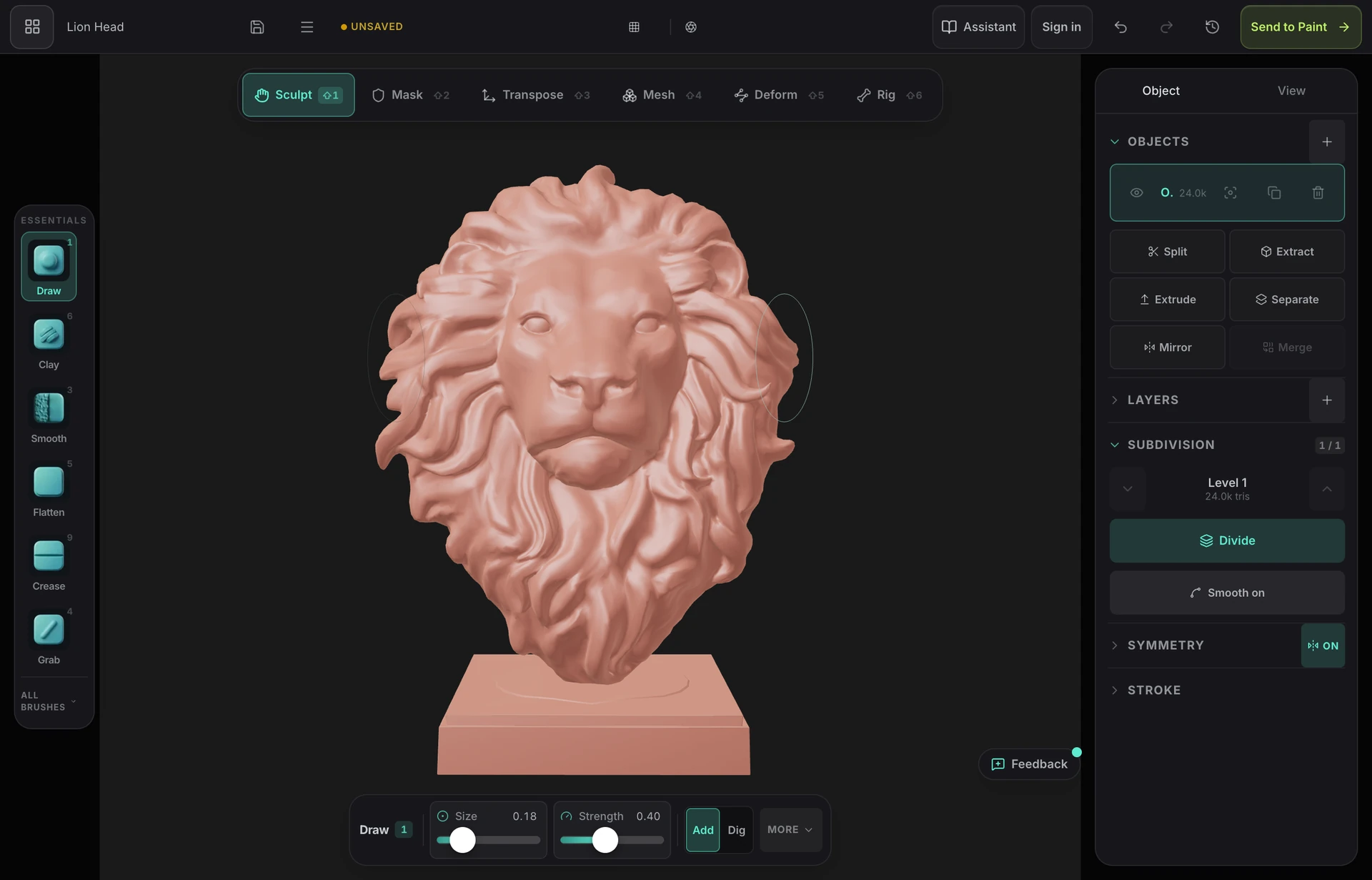
Mold keeps the part that matters — direct, pressure-sensitive brush sculpting over a subdivided mesh, with masking, face sets, symmetry on any axis, live dynamic topology, and multiresolution levels — and runs it in a browser tab. On a desktop with 8 GB or more it divides to around six million triangles, and the heavy operations — Divide, remeshing, opening a large sculpt — run in the background, so dense meshes stay workable without a workstation.
The other difference is what happens after the sculpt. ZBrush hands you a high-poly mesh and wishes you luck in your texturing app. Mold unwraps the sculpt and opens it in Mixos Paint with fresh UVs, ready to paint layered PBR materials — the model-to-textured-asset pipeline stays in one browser. If you sculpt characters for a living, ZBrush is still the tool. If you want real sculpting fundamentals with zero install and a built-in path to textured, render-ready assets, Mold is the lighter way in.
Frequently asked questions
Is Mold a free ZBrush alternative?
Sculpting in Mold is free — every brush, subdivision level, dynamic topology, remeshing, masking and symmetry, on a free Mixos account, with no time limit. Exporting the finished mesh as GLB, OBJ, or STL is on a paid plan from $8.99/mo, which is still a fraction of a ZBrush subscription. So you can learn, block out, and finish a sculpt for nothing, and pay only when you need the file.
Does Mold have dynamic topology like Sculptris Pro?
Yes. Mold adds and removes triangles under the brush as you sculpt, with the detail set by a constant size, the brush size or screen pixels, so resolution goes only where you're working. It can also voxel-remesh or quad-remesh when you want an even surface — the same roles Sculptris Pro and DynaMesh play in ZBrush.
Can Mold handle millions of polygons in a browser?
Yes, within your device's budget. Multiresolution subdivision takes a base mesh to as many as six million triangles on a desktop with 8 GB or more of memory, 1.5 million on an iPad and 1 million on a phone, and Divide, remeshing and opening a large sculpt run in the background with progress. ZBrush still goes much further on a workstation.
Can I paint my sculpt like ZBrush's polypaint?
Not in Mold itself — instead, one click unwraps the sculpt and opens it in Mixos Paint, a full layer-based PBR texture painter with smart materials, masks, and baking. You get complete texture maps rather than vertex colors.
What hardware does Mold need?
A browser with WebGPU — current Chrome or Edge on any desktop OS, no discrete GPU required for moderate meshes. It also works with touch and pencil input on iPad.
Does Mold have VDM brushes and Insert Mesh like ZBrush?
Yes, on a smaller scale. You can capture a vector-displacement tip from a masked patch or from under the cursor, start from seven bundled tips — horn, ear, scale, rivet, bolt, nose and finger curl — and import or export tips as EXR or PNG. Insert Mesh drags a part onto the surface, aligned to it and sized by the drag, from a library of primitives, starter parts and anything you save as a part. ZBrush's VDM and IMM libraries are far larger.

Try it yourself. No install.
Open a tab and sculpt — brushes, subdivision, and symmetry, nothing to download, free to use, and you can decide for yourself how it compares.