Mixos vs Substance Painter
Mixos vs Substance 3D Painter, compared honestly.
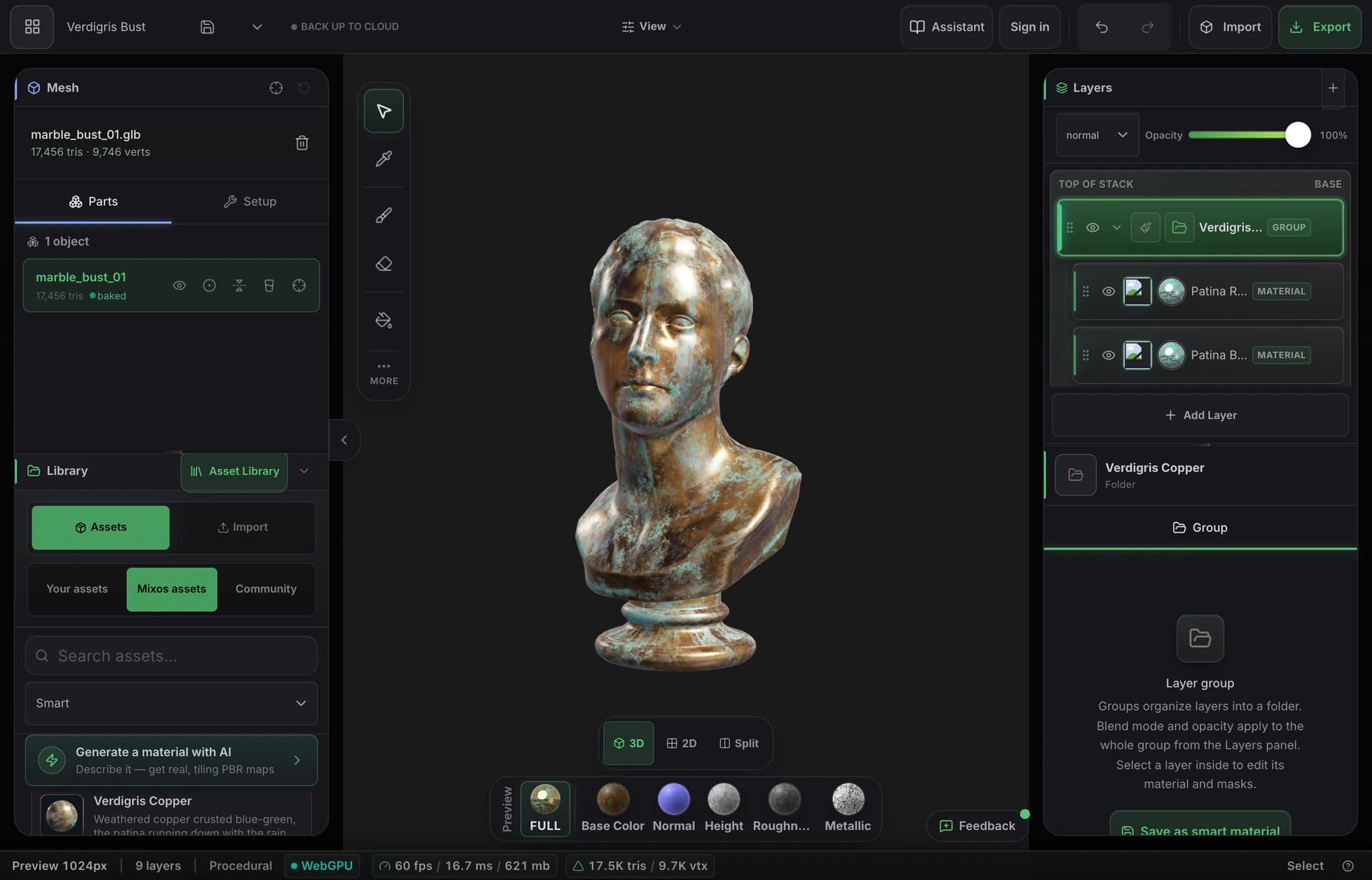
Both let you stack PBR layers, mask them, and paint materials straight onto the mesh. The real difference is everything around that: Substance is the deep, offline desktop standard; Mixos puts the same core workflow in a browser tab — free to author, with AI built in. Here's where each one wins.
Feature by feature
Mixos vs Substance 3D Painter, line by line.
A lime check marks the tool with the edge on each row. Where it's a wash, neither gets one — including the rows Substance wins.
| Feature | Mixos | Substance |
|---|---|---|
| Runs in | A browser with WebGPU — verify device support | Desktop app (Windows, macOS, Linux) |
| Install & setup | None — open a URL and paint | Multi-GB install + GPU drivers |
| Pricing | Free to author; Pro from $8.99/mo | Paid license; current plans and regional prices on Adobe’s site |
| Layer + mask PBR workflow | Yes — blendable layers, masks, height blend | Yes — the reference implementation |
| Paint directly on the mesh | Yes — real-time WebGPU viewport | Yes |
| Procedural depth | Node material graph, smart materials, masks, edge wear + AI | Deep generators, tight Designer integration |
| Smart material presets | Material library, editable layers and AI generation | Large library + Substance Assets |
| Mesh map baking | Yes — AO, curvature, thickness, normal, in-browser | Yes — highly configurable |
| Normal-map convention | OpenGL or DirectX export presets | OpenGL or DirectX project setting |
| Export resolution | Up to 4K PBR map sets + .glb | Up to 8K |
| Collaboration & hand-off | Share a link or a portable project file | Ship the project file + dependencies |
| Works offline | In the desktop app; the browser needs a connection | Yes |
| Native project format | Editable .mxo; production export requires a paid plan | Native .spp project; bitmap export with configurable presets |
Sources and export evidence
Adobe’s pricing, project and export documentation were reviewed on this date. Our downloadable sphere was exported from Paint and imported into Blender 5.1.2. Substance Painter was reviewed from documentation, not tested on this sample; this table is not a visual-quality or speed benchmark.
So which should you use?
Substance 3D Painter is Adobe's industry-standard desktop texturing app — the deepest procedural toolset in the category and the default in most AAA game and film pipelines.
Choose Mixos if…
- You want to texture from any device — laptop, Chromebook, even an iPad — with nothing to install or license.
- Free authoring matters: build complete materials and only pay to export at production resolution.
- You want AI generation for materials, textures, masks and decals built into the same tool.
- Hand-off should be a link, not a folder of files and dependencies.
Choose Substance 3D Painter if…
- You need Substance Designer's depth and .sbsar integration — Mixos has a node material graph, but a far smaller node library.
- Your studio works offline or air-gapped, or needs 8K bakes.
- You're already invested in the Substance asset ecosystem and an established AAA pipeline.
The bottom line
The same layer-and-mask workflow, minus the desktop app
Substance 3D Painter is rightly the standard — non-destructive layers, masks, smart materials, and projection painting, with as much procedural depth as you care to use. Mixos keeps that exact mental model and delivers it through a URL, rendering with WebGPU so the viewport is genuinely real-time in the browser. If you know the Substance workflow, you already know how to drive Mixos.
Where they diverge is cost, access, and what happens when you stop paying. Substance asks for an install, GPU drivers, and a license seat — with licensing terms that depend on the plan you choose. Check the current Adobe pricing page for your region. Mixos asks for a browser tab: authoring is free, your projects always open, and your work is never used to train AI models. That makes it a low-friction way to texture on whatever machine you have, to onboard people who don't have a Substance seat, and to hand work off as a shareable link or a portable project file instead of a scene plus every dependency.
We won't pretend Mixos replaces Substance for every job. Substance goes deeper on procedural generation, bakes to higher resolutions, and runs offline — if that's your pipeline, it stays the right tool. But for fast PBR texturing, learning the workflow, indie and web work, or anyone who just wants to open a tab and paint, a free browser-based painter with built-in AI is a genuinely different proposition.
Frequently asked questions
Is Mixos a true replacement for Substance Painter?
For a lot of work, yes — the core layer-and-mask PBR painting workflow carries over directly, and Mixos exports the same standard map sets. For the deepest procedural pipelines, 8K bakes, or offline studios, Substance still goes further. We're upfront about that in the table above.
Can I open my Substance files in Mixos?
Not the native .spp project format. But the textures Mixos exports — base color, normal, roughness, metallic, height, AO — are standard PBR maps that drop straight into Blender, Unreal, Unity, Godot, Cinema 4D, Maya, and Houdini, the same as a Substance export.
How much does each cost?
Mixos is free to author in; Pro is $8.99/mo and unlocks 4K export, more AI credits and cloud storage. Adobe offers paid Substance 3D plans that include Painter. Prices, taxes and billing commitments vary by region and plan; use the linked official pricing page for a current quote.
Can I inspect a real Mixos export?
Yes. The linked Paint-to-Blender tutorial includes the actual export ZIP, a textured GLB and the verified Blender scene. It checks the UV layer, PBR color spaces and normal-map connection. This is a Mixos handoff test, not a hands-on Substance Painter benchmark.

Try it yourself. No install.
Open a tab and texture a model in minutes — free to author, nothing to download, and you can decide for yourself how it compares.