3D sculpting software

3D sculpting software with nothing to install.

Most sculpting programs start with a licence, a download and a machine that can run them. This one starts with a URL. Push, pull, smooth and carve organic form with pressure-sensitive brushes on your GPU, subdivide into millions of triangles, remesh when the topology stops cooperating — and export STL, OBJ or GLB when you're done.

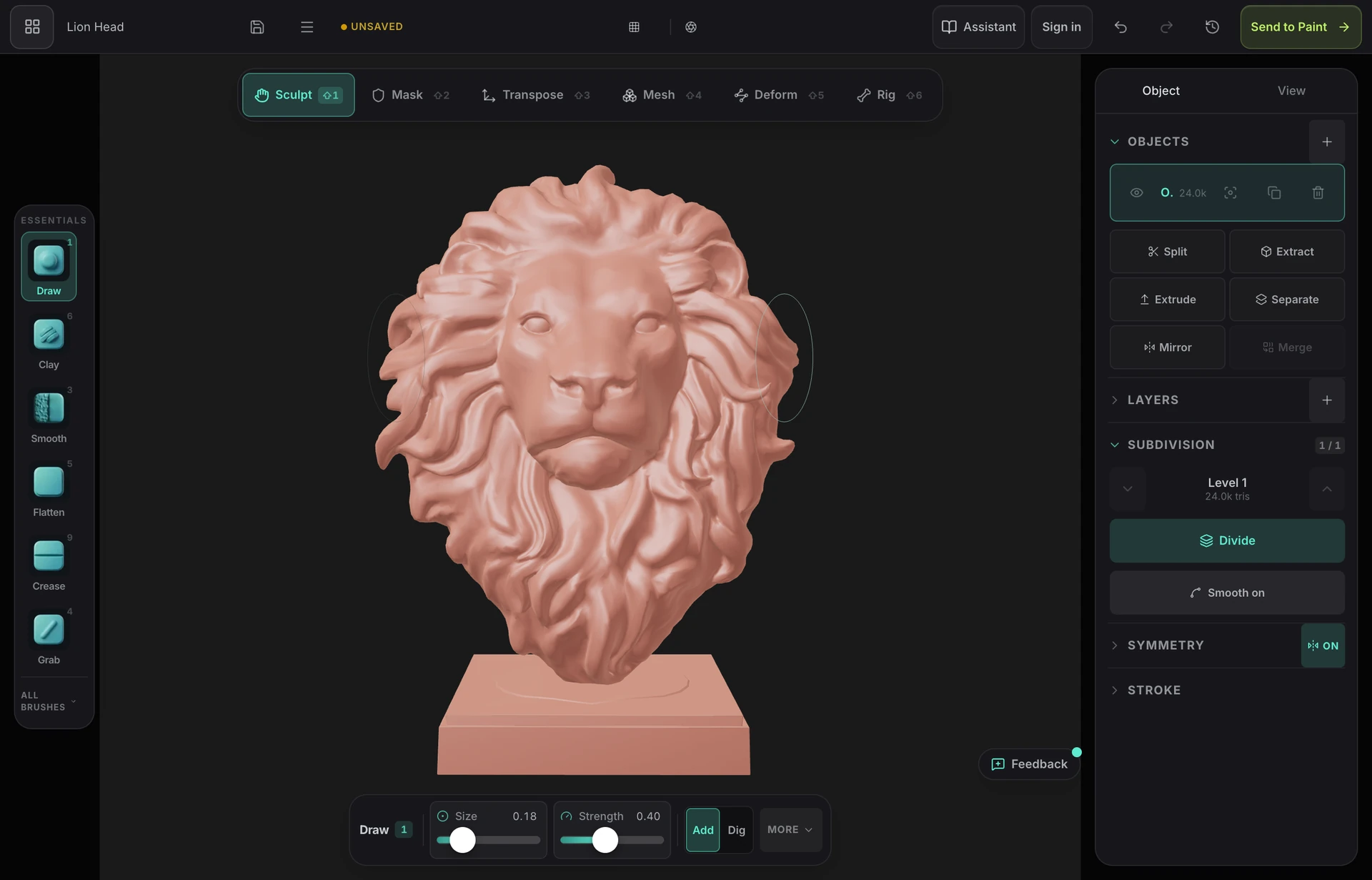
The Mold 3D sculpting software interface in a browser tab — the brush rail, the six-mode toolbar, a sculpted character bust in the viewport, and the subdivision and symmetry panels

The full sculpting loop

Clay, draw, inflate, grab, snake hook, flatten, scrape, polish, trim, pinch, crease and dam — pressure-sensitive, with falloff, stroke modes, alphas, masking and mirror or radial symmetry. Not a demo subset.

Multiresolution and dynamic topology

Subdivide to sculpt broad form low and fine detail high, stepping between levels freely — so a proportion mistake found late costs you a minute, not the detail pass. Or let the mesh tessellate under the brush as you pull new shape out of it.

Remesh, retopologise, decimate

Voxel remesh rebuilds a tangled sculpt as one clean watertight surface. Quad remesh and adaptive ZRemesh give you flowing topology. Decimate takes the export down to a size a slicer or an engine will accept.

Then texture it, in the same tab

Most sculpting programs hand you a high-poly mesh and wish you luck. One click unwraps this one with fresh UVs and opens it in a layered PBR painter — blockout to textured asset without changing applications.

See it in action

One toolkit, whatever you sculpt

A stylised dragon head sculpted in Mold — swept-back horns, layered scales and crisp secondary forms in matte clay
Creature and character work — the case digital sculpting exists for, and what the clay, crease and pinch brushes are tuned around.
An armoured fantasy warrior miniature sculpted in Mold, standing on a round base with a cloak and detailed plate armour
Tabletop miniatures — voxel remesh makes the figure watertight, decimate brings the count down, and STL export feeds the slicer.
An ornate symmetrical floral rosette sculpted in deep relief in Mold
Decorative relief — radial symmetry and the layer brush do most of the work on ornament like this.
A sleek sci-fi helmet sculpted in Mold with clean panel lines, a defined visor and crisp bevelled edges
Hard surface — hPolish, trim and flatten hold crisp planes and edges where a purely organic brush set would smear them.

Why Mixos

How to choose a sculpting program

The honest shape of this market is three tiers. ZBrush sits at the top: two decades of depth, hundreds of brushes, ZRemesher and ZModeler, and a place in nearly every film and games character pipeline. Blender is the serious free desktop option — it sculpts genuinely well, exports without restriction, and costs nothing, at the price of being a very large program to learn for a job this specific. Below those sit the focused tools: Nomad Sculpt on tablets, 3D-Coat for voxel work, and browser tools like Mold.

What actually separates them for a person starting out is rarely brush count. It is whether the program runs on the machine you own. A large share of people who want to sculpt never make a single stroke, because they stall somewhere between the licence page, the multi-gigabyte download and the discovery that their laptop's graphics driver is unhappy. Every feature comparison in the world is irrelevant to someone stuck at that step.

Mold's answer is to remove the step entirely. It renders on WebGPU, the graphics API already built into current browsers, so it runs on Mac, Windows, Linux, ChromeOS, iPad and Android with nothing to install and no driver to maintain. Vertices are displaced on the same GPU device that draws the viewport, which is why dense meshes stay responsive rather than feeling like a web toy.

What you give up is depth at the professional end — the enormous configurable brush libraries, the plugin ecosystems, the hand-retopology tools that a hero animated character needs. What you keep is the part most people use every day, plus a texturing pipeline attached to the end of it. Sculpting is free on any account, with no time limit and no watermark; exporting the mesh is what a paid plan covers, so you can take a model from blockout to textured before deciding whether it is worth paying for.
Frequently asked questions

What is the easiest 3D sculpting software to learn?

For most beginners the deciding factor is setup, not interface. A browser tool removes the install, licence and driver steps that stop people before their first stroke, and Mold's brush set is deliberately conventional — clay, smooth, grab, pinch, crease — so what you learn transfers to ZBrush or Blender later. Nomad Sculpt is the other easy starting point if you work on a tablet. Blender is powerful and free but is a much larger program to learn for sculpting alone.

Is there free 3D sculpting software?

Yes, several. Blender is fully free including export and is the most capable. Mold is free to sculpt in — every brush, all subdivision levels, dynamic topology, remeshing, masking and symmetry, no time limit and no watermark — with mesh export on a paid plan. Sculptris is free but discontinued and unmaintained. ZBrush has no free tier.

Do I need a powerful computer for 3D sculpting?

For a dense multi-million-triangle detail pass, a real GPU helps a great deal. For blockouts and mid-detail work, far less than people assume — Mold runs comfortably on laptops, iPads and Android tablets, and on Chromebooks that cannot run desktop sculpting packages at all. A practical pattern is to rough shapes out wherever you are and push the subdivision levels when you're back at a desk.

What is the difference between sculpting and 3D modelling software?

Modelling software has you place vertices, draw edge loops and extrude faces — precise, planned, and right for anything you can describe with measurements. Sculpting software has you push, pull and smooth a surface with brushes, which suits organic shapes you can only judge by eye. Most artists use both and meet in the middle: sculpt the form, then build clean geometry over it.

Can I use sculpting software for 3D printing?

Yes, and it is one of the most common uses. The mesh needs to be watertight — a single closed surface — which a voxel remesh produces, and fragile parts need thickening before they will survive printing. Mold exports STL, the format every slicer accepts.

Mixos

Open a tab. Start sculpting.

No installer, no licence, no driver update. Pick up a sphere and start pulling shapes out of it — free, on whatever machine you're reading this on.
