What is procedural texturing?
Procedural texturing means describing how a surface is made rather than painting what it looks like. Instead of pixels, you build a small set of rules — noise at this scale, warped this much, darkened where the model is concave — and the material is generated from them. Change a rule and the whole surface re-derives.
By Mixos
The short answer
A procedural material is built from a node graph: generator nodes produce patterns, filter nodes shape them, blend nodes combine them, and the output becomes the surface's PBR channels. Because every step stays live, the material is resolution-independent, endlessly tweakable, and reusable across models — unlike a painted texture, which is fixed once the pixels are down.
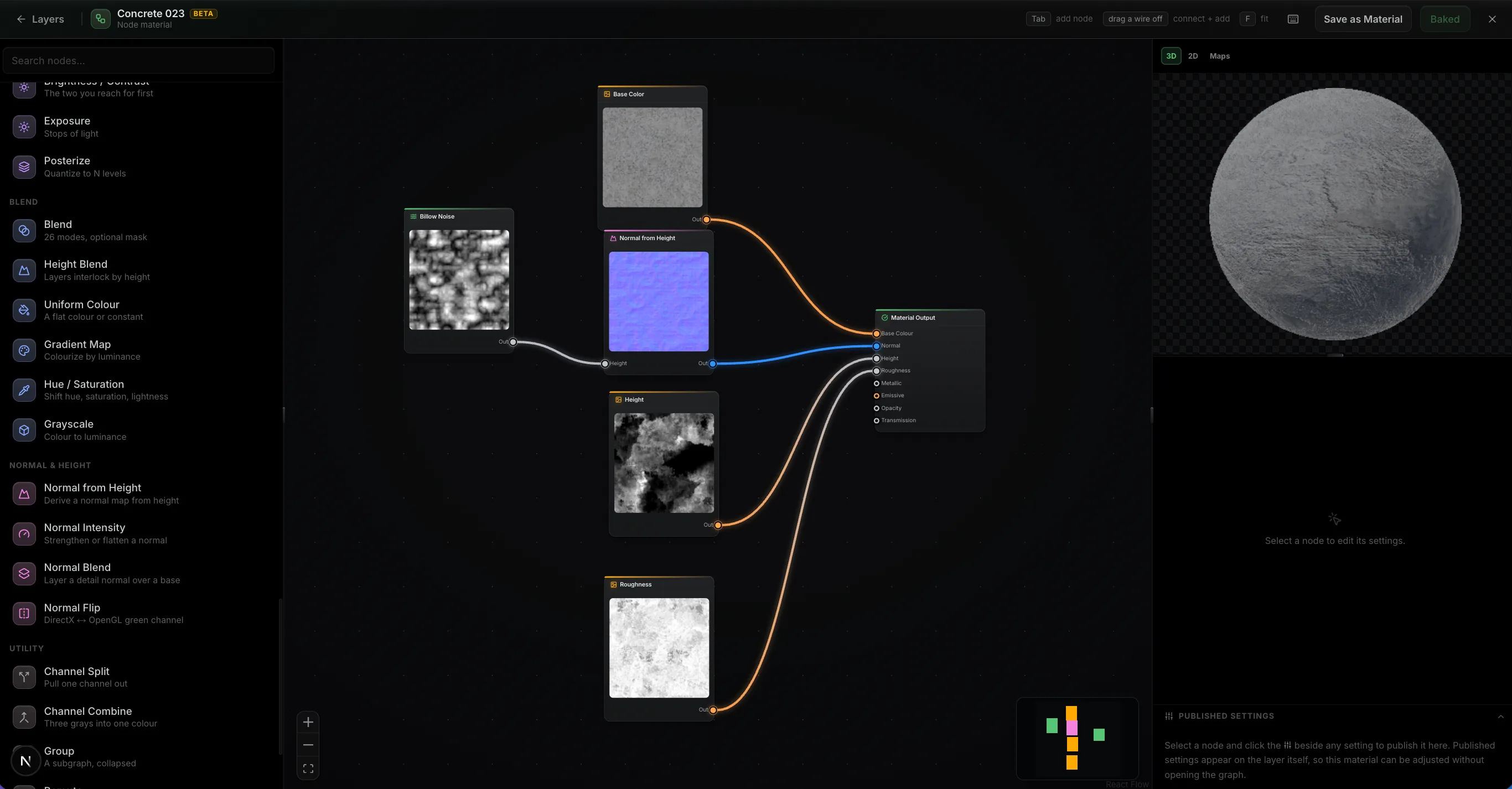
Rules instead of pixels
A hand-painted texture is a picture: a grid of pixels that means whatever you painted into it. A procedural texture is a recipe. It says something like 'start with cell noise at eight tiles across, warp it slightly so the cells aren't regular, use that as the grout pattern, then darken the grout where the model's ambient occlusion is high.' Nothing is stored as an image until the moment it's evaluated.
That distinction has practical consequences. Because the material is a description, it can be rendered at any resolution without softening — the same graph produces a 512px preview or a 4K export from the same rules. Because it's parameterized, 'make the tiles bigger' is one slider rather than a repaint. And because it's a description, it isn't tied to one model: the same graph applied to a different mesh generates an appropriate result for that shape.
How a node graph actually works
Procedural materials are almost always authored as node graphs, because a recipe is naturally a chain of steps. Nodes fall into a few families. Generators invent something from nothing — fractal noise, cell or Voronoi patterns, gradients, stripes. Filters take one input and reshape it — blur, levels, curves, hue and saturation adjustments, warps that push a pattern around so it stops looking mechanical. Blends take two inputs and combine them by a mode or a mask.
The graph ends at an output node that maps your results onto the PBR channels: this branch drives base color, this one height, this one roughness. Because channels are authored together from shared upstream nodes, they stay consistent — the same noise that raises a bump can roughen the surface and darken the color at exactly the same spots, which is precisely what makes a procedural material read as one physical surface rather than four unrelated maps.
The step that makes graphs feel intelligent is feeding the mesh's own data in. Bake ambient occlusion, curvature, cavity, and slope from your model, and those maps become graph inputs — so 'dirt in the crevices' becomes a blend masked by occlusion, and 'paint worn off the edges' becomes a blend masked by curvature. The material then adapts to whatever shape you apply it to.
Procedural vs. hand-painted
Procedural wins where a surface has logic: brick, tile, fabric weave, scratched metal, rust that pools in the low spots, wear along every edge. These are rule-shaped, they need to cover large areas without visible repetition, and they benefit enormously from being adjustable after the fact.
Hand-painting wins where a surface has intent: a specific stain that tells a story, a logo in an exact position, deliberate art direction on a hero asset. No graph will place a scuff exactly where the story needs it.
In practice, almost every good material is both. The usual approach is to build the base procedurally so it covers and adapts, then paint on top for the specifics — which is why it matters that procedural materials and painted layers can live in the same stack rather than in separate applications.
Trying it without installing anything
Historically, procedural authoring meant a dedicated desktop application and a license. Mixos includes a node-based material editor in the browser: add a Node Material layer, wire generators through filters into blends, and watch the result resolve on your model in real time as the graph evaluates on your GPU.
Because the graph is a layer rather than a separate document, you can mask it, blend it with other layers, and paint over it — the procedural-base-plus-painted-detail workflow, without an export step in the middle.
The last step of authoring anything procedural is deciding what stays adjustable. In Mixos that's publishing: click the slider glyph beside a parameter and it becomes a variable on the material, which you can rename, group and give a sensible range. Those published settings appear on the layer's own panel, so the finished material is a few meaningful knobs — tile size, wear amount, a color — long after you've stopped thinking about the graph behind them.
Frequently asked questions
What is procedural texturing in simple terms?
It's building a material out of rules instead of pixels. You describe how the surface is generated — patterns, distortions, blends — and the computer produces the image. Changing a rule regenerates the whole material, so nothing is baked in until you export.
Is procedural texturing better than hand-painting?
Neither is better; they solve different problems. Procedural is better for rule-shaped surfaces that need to cover large areas and stay adjustable. Hand-painting is better for deliberate, specific detail. Most production materials use a procedural base with painted detail on top.
Do procedural textures tile seamlessly?
Generally yes — generator nodes are usually written to wrap at the tile edge, so the output tiles without visible seams by construction. That's a major reason procedural materials are used for large surfaces like terrain, walls, and floors.
Do I need to be technical to build a node graph?
Less than you'd expect. The mental model is a chain of simple steps, and most materials use a handful of node types. It helps to start by opening an existing material as a graph and changing things to see what moves, rather than building from an empty canvas.
Can procedural materials react to the model's shape?
Yes, and it's the technique that makes them look convincing. Bake maps like ambient occlusion and curvature from the mesh and feed them into the graph as masks, so dirt settles into recesses and wear appears on edges automatically, wherever those features happen to be on that particular model.
What are exposed parameters, or a material's variables?
A graph can have hundreds of numbers in it, but only a few matter to whoever uses the material — tile size, how worn it is, its color. Exposing (Mixos calls it publishing) lifts those out of the graph and onto the material itself as named variables with their own ranges, so the material can be retuned without anyone reading the graph. It's what separates a reusable material from a one-off.
